Jackery Explorer 1000 v2 Review: Fast-Charging Backup Power That Travels Well
At a Glance
KEY FEATURES
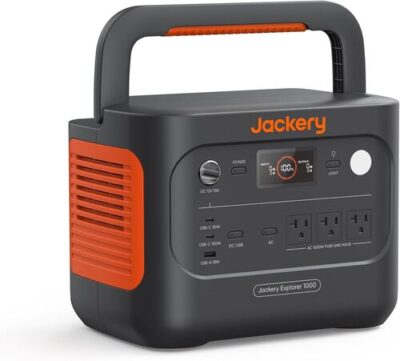
- Battery: 1,070Wh, LiFePO4, rated for 4,000 cycles to 70% capacity
- AC output: 1,500W continuous, 3,000W surge, pure sine wave
- Ports: 3 AC, 2 USB-C, 1 USB-A, 1 DC car port
- Recharge: AC 1 hour in emergency fast-charge mode / 1.7 hours default, solar up to 400W, car charging supported with optional cable
- Smart features: Jackery app, Wi-Fi, Bluetooth, charge mode control, quiet charging mode, battery-saving mode
- Best for: Fridge backup, CPAP, camping, RV trips, Starlink, routers, phones, laptops, fans, lights, and short jobsite tasks
PROS
- 1,070Wh LFP capacity in a manageable 23.8-pound chassis.
- 1,500W continuous and 3,000W surge cover many short appliance loads.
- Fast AC recovery and up to 400W solar input.
- Useful AC, 100W USB-C, 30W USB-C, USB-A, and 12V mix.
CONS
- No capacity expansion path for longer backup.
- High-watt loads can drain 1,070Wh rapidly.
- Fast-charge modes and UPS behavior need exact-use testing.
- Solar compatibility depends on two input limits and correct adapters.
Editor's Choice
Based on exact documentation and qualitative exact-ASIN owner evidence; no hands-on test or population-rate claim
⚡ Can the Jackery Explorer 1000 v2 Run It?
Choose a common device and see the estimated runtime, whether the inverter can handle it, and how long the power station may take to recharge.
Picture this: the power goes out, your fridge is warming up, your router is dead, and your phone is already low. You don’t want to drag a gas generator outside for a short outage. At the same time, a tiny battery bank won’t keep a refrigerator, CPAP, or Starlink setup alive for long.
The Jackery Explorer 1000 v2 isn’t trying to run your whole house. In practice, it works best as a quiet backup for essentials — fridge, CPAP, router, phones, laptops, fans, lights, and a few short bursts from kitchen or jobsite gear. That’s exactly where most owners seem happiest with it.
The Explorer 1000 v2 earns attention because it combines 1,070Wh of LFP storage, 1,500W continuous output, 3,000W surge headroom, and a 23.8-pound chassis. That balance matters more than any single headline. It is light enough for one person to move repeatedly yet large enough to cover meaningful overnight electronics or a short refrigerator outage. The tradeoff is equally clear: a high-output inverter can accept loads that empty a 1kWh battery quickly.
Owner evidence clusters around mobility, solar charging, runtime, CPAP and other small loads, fan behavior, app controls, ports, and occasional charging or support problems. Successful accounts establish realistic scenarios; critical accounts identify acceptance tests. They do not establish a population failure rate. Before relying on the station, reproduce the intended overnight load, a full recharge, every required output, and recovery after an interruption.
| Mission | Energy question | Acceptance test |
|---|---|---|
| CPAP night | Measured average watts with humidifier and heated hose settings | Run a full night on the intended AC or approved DC route |
| Refrigerator outage | Compressor cycle energy and startup behavior | Measure a representative day and preserve overnight reserve |
| Creator workstation | Laptop, monitor, camera, lighting, and charging watt-hours | Connect the complete port layout and watch thermal behavior |
| Camp kitchen | Short high-watt events plus all background loads | Sequence appliances rather than operating everything together |
Jackery documents standard AC charging in roughly 1.7 hours and an app-enabled emergency mode around one hour. Treat the faster mode as an occasional recovery tool and confirm the branch circuit, ambient temperature, and fan behavior. A small gasoline generator may also be unhappy with a sudden high charging draw, so test source stability rather than assuming wattage alone guarantees compatibility.
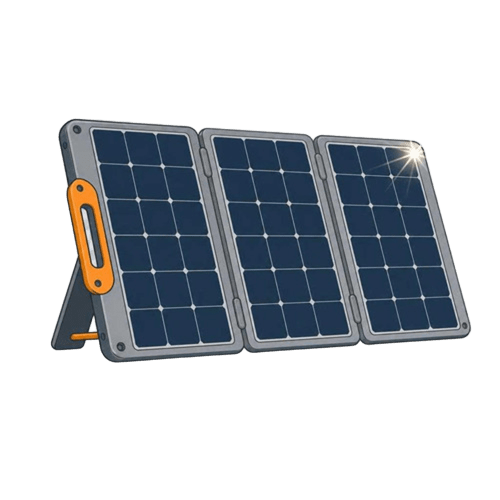
Solar input is a two-port, 400W-class proposition, not permission to connect any nominal 400W array. Verify the current manual, cold-corrected open-circuit voltage, current per input, connector and adapter, polarity, and cable loss. Two appropriately designed panel groups can be more useful than one awkward oversized string. Under variable weather, daily harvested watt-hours—not a brief peak—decide whether the station can repeat the mission.
The app adds charging modes and monitoring, but core use should not depend on a phone being available. Confirm the physical buttons, display, output persistence, standby behavior, and any UPS-like transfer with the exact electronics. A medical device requires its own manufacturer-approved backup plan; this review cannot certify compatibility.
Evidence-led verdict: the Explorer 1000 v2 is strongest when a buyer values low weight, simple direct outputs, and fast recovery more than maximum capacity or ecosystem expansion. Buy it with a written 1,070Wh energy budget, not because 1,500W sounds like long runtime.
Explorer 1000 v2: A One-Person 1kWh Power Plan
If you want quiet backup power for camping, RV use, CPAP, fridge support, or short blackouts, this power station works. For this Jackery Explorer 1000 v2 review, the biggest strengths are the fast AC recharge, strong 1,500W inverter, light-for-class weight, and long-life LiFePO4 battery. That said, the app can be flaky, solar charging is not as open as some rivals, and AC runtime needs realistic math because inverter losses are real.
The 23.8-Pound Advantage Is Operational
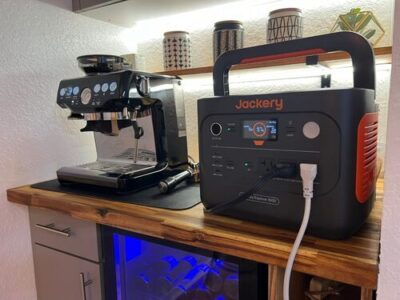
Jackery kept the Explorer 1000 v2 compact for its capacity. At 12.87 x 8.82 x 9.72 inches, it fits in a car trunk, on a kitchen counter during an outage, or beside a camp table without eating the whole surface.
The 23.8-lb weight is one of its best design choices. You still feel the solid heft when you lift it, but the folding top handle makes it easier to carry than boxier power stations with side grips. In practice, it’s comfortable enough for car camping, RV loading, and moving from room to room.
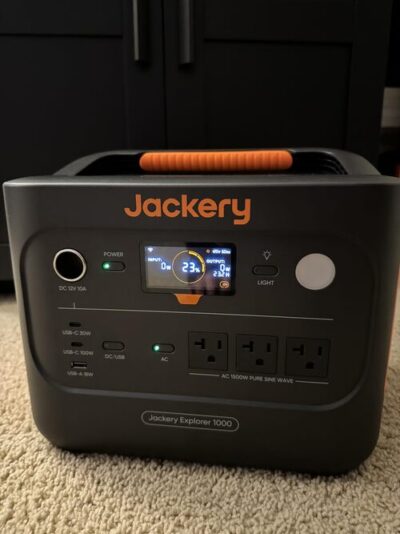
The display is also a highlight. Owners like seeing battery percentage, input watts, output watts, and time estimates without digging through the app. That said, runtime estimates can get optimistic with tiny AC loads, especially when inverter standby draw enters the picture.
| Design Detail | Real-World Take |
|---|---|
| Folding handle | Easy to carry short distances and folds flat for storage |
| Front-facing outlets | Handy during outages because cords stay visible |
| Compact body | Easier to place on counters, shelves, and camp tables |
| Display | Clear and useful, though runtime estimates need caution |
| Weight | Light for 1kWh LiFePO4, but not backpack-friendly |
Worth knowing, the port layout favors simplicity over maximum port count. You get the basics, but not a huge USB bank or a dedicated expansion port.
Allocate 1,070Wh by Mission, Not Appliance Count
The Jackery Explorer 1000 v2 portable power station has a 1,070Wh battery. In plain English, that’s enough to run small electronics for a long time, a CPAP overnight, a portable fridge for many hours, or a full-size refrigerator through a shorter outage.
Here’s the thing: AC runtime is not the same as the printed Wh number. When you use wall outlets, the inverter uses some energy to convert battery power to AC power. Low-watt AC loads can also lose extra runtime because the inverter stays on even when the device itself barely draws power.
| Device | Typical Power Draw | Estimated Runtime | Realistic with Margin |
|---|---|---|---|
| Smartphone charging | 10–15Wh per charge | About 60–85 charges | About 50–75 charges |
| Laptop | 50–80Wh per charge | About 11–17 charges | About 9–14 charges |
| Wi-Fi router | 10–20W | About 40–80 hours | About 30–55 hours |
| CPAP, no humidifier | 30–60W | About 14–27 hours | About 12–22 hours |
| CPAP, humidifier on | 50–90W | About 9–16 hours | About 7–13 hours |
| Mini fridge | 40–80W cycling | About 10–20 hours | About 8–18 hours |
| Full-size refrigerator | 100–200W cycling plus surge | About 4–8 hours steady draw | Often 8–15 hours if cycling normally |
| Electric blanket | 50–80W | About 10–16 hours | About 8–14 hours |
| Portable cooler on DC | 25–45W cycling | About 20–35 hours | About 18–30 hours |
| 1500W kettle | 1500W | About 30 minutes | Briefly only |
Real-World Math — At 0.85 AC efficiency, the listed 1,070Wh delivers roughly 910Wh through the AC outlets. Subtract a 10% battery reserve, and you’re working with about 819Wh of practical AC energy.
In real use, customer stories line up with that mixed picture. People running refrigerators, routers, TVs, fans, and CPAP machines tend to be happy. On the flip side, buyers expecting the full 1,070Wh through AC outlets can be disappointed, especially with low-watt devices that run for days on paper but lose energy to inverter overhead.
A 1,500W Inverter With a Finite Energy Tank
In practice, the sweet spot is short high-draw use and long low-draw use. A microwave for a few minutes? Reasonable. A hair dryer, large saw, or 1,875W appliance? That’s where you should expect trouble.
| Device | Typical Draw | This Unit? |
|---|---|---|
| Phone / tablet | 10–25W | Easy |
| Laptop | 50–100W | Easy |
| LED lights | 5–15W each | Easy |
| Wi-Fi router | 10–20W | Easy |
| Starlink | 40–100W | Easy |
| Mini fridge | 40–80W cycling | Easy |
| CPAP, no humidifier | 30–60W | Easy |
| CPAP, humidifier on | 50–90W | Easy |
| Full-size fridge | 100–200W cycling, higher startup surge | Easy |
| Drone battery charger | 60–100W | Easy |
| Microwave, 700W class | Around 1,100–1,400W draw | Borderline |
| Electric kettle | Around 1,500W | Briefly only |
| Hair dryer | Around 1,875W | Trips inverter |
| Window AC, small inverter type | 500–1,200W running | Borderline |
| Corded drill or sander | 400–900W with surge | Easy |
| Large miter saw | High startup surge | Trips inverter |
Worth Knowing — Continuous output is the real ceiling. The 3,000W surge rating only lasts briefly — long enough to help start a fridge compressor, not long enough to run a device that needs more than 1,500W continuously.
To be fair, this is not a weak inverter. It takes lots of normal household and camping loads without breaking a sweat. The catch is that heat-making appliances burn through battery fast, even when they technically run.
Fast Grid Recovery, Two-Lane Solar, Slow Vehicle Input
Charging speed is one of the biggest reasons to consider this Jackery 1070Wh LiFePO4 power station. From a wall outlet, Jackery lists about 1 hour in emergency fast-charge mode and about 1.7 hours in the default mode. Brand loyalists often read our Jackery and EcoFlow brand comparison before committing. Customers often describe the normal recharge as fast enough that they don’t bother using the fastest setting every time.
That said, the 1-hour charge mode depends on the Jackery app. If you want maximum battery life, the standard mode is the more relaxed choice. If a storm is rolling in and you need power now, fast charging is a real advantage.
| Charging Mode | Time from Empty to Full | Noise Level |
|---|---|---|
| Quiet AC mode | About 5–6 hours | Quiet, about 30 dB |
| Standard AC | About 1.7 hours | Moderate |
| Emergency fast AC | About 1 hour | Noticeable fan noise |
| Car charging | About 11–14 hours at 80–100W | Silent from the unit |
| 100W solar | About 12–14 hours strong sun | Silent |
| 200W solar | About 6–7 hours strong sun | Silent |
| 400W solar | About 3–4 hours strong sun | Silent |
Grid Recovery — Explorer 1000 v2
AC charging is fast for this size class. In real use, that matters during outages because you can top it from a gas generator, a working outlet, or solar-backed home power without waiting all day.
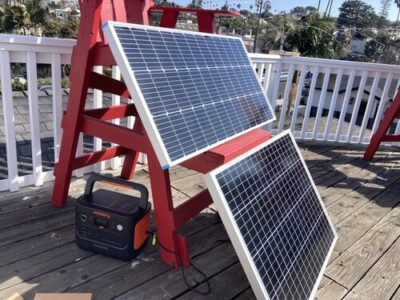
Solar Recovery — Explorer 1000 v2
Adapter Check — If you already own non-Jackery panels, check the connector, voltage range, and warranty terms before buying. Some owners use adapters, but plug fit and safe input specs matter more than saving a few dollars.
Vehicle Recovery — Explorer 1000 v2
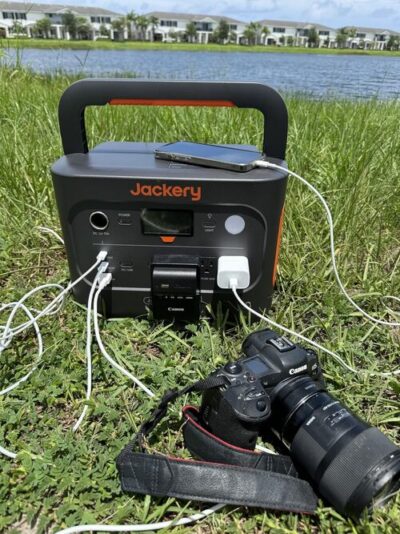
Car charging is useful for road trips, but it’s slow. Think of it as a travel top-off or emergency trickle, not the best way to refill a 1,070Wh battery from empty.
Build the Port Map Before Leaving Home
The port lineup covers most everyday needs: three AC outlets, two USB-C ports, one USB-A port, and one 12V car socket. One USB-C port supports up to 100W PD, which is great for laptops, tablets, and fast phone charging without a wall brick.
In practice, the AC outlets are the stars here. Owners use them for appliances, tools, routers, TVs, Starlink, heated blankets, coffee gear, CPAP machines, and chargers. On the flip side, the USB selection feels a little limited for a modern 1kWh station, especially if you like plugging in a bunch of phones, tablets, lights, and accessories at once.
| Port | What You Get | Practical Note |
|---|---|---|
| AC outlets | 3 outlets | Good for outage and camping loads |
| USB-C | 2 ports | One supports up to 100W PD |
| USB-A | 1 port | Fine for older devices, but limited |
| 12V car socket | 1 port | Useful for coolers and DC accessories |
| Solar input | Up to 400W | Best with compatible Jackery setup |
| Expansion port | Not specified | No true add-on battery system |
Here’s what matters: the Jackery Explorer 1000 v2 battery is simple to use. Still, people who want a heavy USB charging hub, native MC4 flexibility, or expandable capacity may prefer a different model.
Quiet Loads and Fast Charging Are Different Sound Events
The Explorer 1000 v2 is quiet under light loads. Customers running fridges, routers, CPAP machines, phones, laptops, and small electronics often describe it as easy to live with indoors. The sound profile is much closer to a quiet fan than a gas generator.
At the same time, fast charging and heavier AC loads can wake the fans up. That’s normal, and feedback suggests the unit does a good job managing heat. For bedrooms, RVs, tents, and home offices, quiet mode is the setting you’ll likely appreciate most.
Pro Tip — Use standard or quiet charging overnight, then save emergency fast charging for daytime top-offs. You’ll get less fan noise and still keep the battery ready.
Heat doesn’t seem to be a major recurring complaint. In real use, owners mention the unit staying cool or only mildly warm under sensible loads.
Simple Hardware, App-Dependent Advanced Settings
The front display is one of the most useful everyday features. You can see battery percentage, live input watts, live output watts, and estimated time remaining. Beginners won’t need to understand electrical theory just to know whether the fridge is pulling 132W or the charger is feeding 780W back in.
The app adds useful control, especially for charging modes. The catch is connection reliability. Some owners like the app, while others complain about Bluetooth dropouts, Wi-Fi disconnects, or needing a hard reset to reconnect.
Local Status — Explorer 1000 v2
- Battery percentage
- Input watts live
- Output watts live
- Time-to-empty / time-to-full
- Warning icons (limited)
- Charging mode indicator
- Battery temperature (not specified)
App Controls — Explorer 1000 v2
- Toggle AC / DC output remotely
- Adjust charging speed
- Set battery-saving behavior
- Update firmware
- Monitor power remotely
- Pair without connection drama (limited)
For beginners, the Jackery Explorer 1000 v2 portable power station feels easy to use. The buttons are straightforward, the display is readable, and the app is helpful when it behaves. Honestly, the unit would be better if all key charging modes were easier to access without relying on wireless pairing.
LFP Longevity Still Needs an Acceptance Test
The Explorer 1000 v2 uses a LiFePO4 battery. That’s a big upgrade if you plan to use your power station often, because LFP chemistry is known for long cycle life and better thermal stability than older lithium-ion packs. Jackery claims 4,000 cycles to 70% capacity, which suits campers, RV owners, outage prep, and people who cycle the battery regularly.
Long-Term Ownership — 4,000 cycles to 70% capacity means years of frequent use before major capacity loss. Daily users should still avoid storing the battery empty or full for long stretches.
Safety features include battery management protections, pure-sine AC output, app-controlled charging modes, and battery-saving behavior. Worth knowing, battery saver can limit charging to around 85% and stop discharge before empty, which protects the pack but reduces usable runtime.
Best Practice — For storage, leave the unit around 50–80% charge and top it off every 3–6 months. LiFePO4 is forgiving, but long storage at 0% or 100% is still not ideal.
Warranty and support feedback is mixed but not one-sided. Some owners describe slow or frustrating exchanges after failures, including F3 or F6 error situations. On the flip side, several buyers say Jackery eventually replaced units, followed up, or made the situation right.
Explorer 1000 v2 Mission Board
| Use Case | Fit | Why |
|---|---|---|
| Weekend car camping | Strong fit | Good capacity, manageable weight, useful AC and USB ports |
| RV side-trip / van life | Solid fit | Great for Starlink, fridge, fans, lights, and device charging |
| Home blackouts under 8 hours | Strong fit | Handles fridge, router, phones, lights, and TV loads well |
| Multi-day off-grid cabin | With caveats | Works if you add solar, but capacity is not expandable |
| CPAP overnight backup | Strong fit | Enough capacity for overnight use, especially without humidifier |
| Refrigerator backup | Solid fit | Strong surge support, but runtime depends on compressor cycling |
| Jobsite power tools | Borderline | Good for chargers and smaller tools, not big surge saws |
| Quiet bedroom backup | Solid fit | Quiet under light loads, better in quiet mode |
| Hurricane / multi-day outage | With caveats | Useful when paired with solar or a gas generator for recharging |
| Tailgating / outdoor events | Strong fit | Portable enough and strong enough for small appliances and entertainment |
| Backpacking / lightweight EDC | Skip | 23.8 lb is far too heavy for trail carry |
| Apartment without solar access | Solid fit | Fast wall charging makes it practical even without panels |
You’ll probably be happy if you want:
- A quiet LiFePO4 power station for short outages
- A camping battery that can run a fridge, lights, phones, and a laptop
- A CPAP backup that doesn’t require fuel or fumes
- Fast wall charging before storms or after a night of use
- A 1kWh unit that’s still reasonable to carry short distances
You might want to skip it if you need:
- Whole-home backup
- A power station for 1,800W appliances
- A native expansion battery system
- Long-distance carry weight under 15 lb
- Fully open third-party solar compatibility out of the box
Different tool, different job. In practice, this Jackery is at its best when you need quiet, portable, medium-duty power — not when you’re trying to replace a large home battery or gas generator.
Pros & Cons Analysis
Based on documented specifications and owner feedback
Pros
- Portability changes actual use — At 23.8 pounds, one person can reasonably move it between an outage room, vehicle, campsite, or work location.
- Output suits a broad middle class — The 1,500W inverter accepts many refrigerators, tools, kitchen devices, and electronics when startup and combined load are verified.
- Recovery can fit short turnarounds — Standard and emergency AC modes plus dual solar inputs create several practical ways to restore energy.
- LFP supports repeated use — The documented cycle-life target suits routine camping and backup better than an occasional-use-only battery.
- Owner missions are concrete — The evidence supports CPAP, communications, refrigeration, mobile work, travel, and camping as plausible roles.
Cons
- Capacity is the harder boundary — Cooking, heating, or continuous high loads can consume the battery long before the inverter reaches its power ceiling.
- Solar needs two-channel planning — Cold voltage, current, adapters, and panel grouping must be checked for each input rather than inferred from total watts.
- Emergency charging is not universally gentle — Circuit quality, generators, temperature, and fan behavior can make the fastest setting unsuitable.
- Software requires commissioning — App pairing, standby, charge mode, output persistence, and restoration should be recorded before unattended use.
- Service evidence is mixed — Keep seller, serial, photos, logs, and test results so any remedy request is specific and timely.
Our Verdict
After this Jackery Explorer 1000 v2 review, the clearest takeaway is simple: it's a strong, practical 1kWh power station for people who want fast charging, useful inverter output, and long-life LiFePO4 chemistry in a body that still travels well. It's especially good for camping, RV nights, CPAP backup, fridge support, routers, Starlink, phones, laptops, and short outage prep.
That said, don't buy it expecting unlimited AC runtime or whole-home coverage. If your plan is to run essentials quietly and recharge quickly, the Jackery Explorer 1000 v2 portable power station is an easy recommendation. If you need multi-day backup without recharging, open solar flexibility, or expandable capacity, step up to a larger system.
Frequently Asked Questions
How long will the Jackery Explorer 1000 v2 run a refrigerator?
Many owners use it for refrigerator backup during outages. Expect roughly 8 to 15 hours for a full-size fridge depending on compressor cycling, room temperature, door openings, and surge behavior. A portable DC cooler can run longer, especially when connected through DC instead of AC.
Can the Jackery Explorer 1000 v2 run a CPAP overnight?
Yes. Customers use it for CPAP backup and camping. With humidifier and heated hose turned off, it can usually cover multiple nights. With humidity or heat on, runtime drops because the CPAP draws more power.
Can it run a microwave or electric kettle?
It can run some microwaves and short high-draw loads because the inverter is rated at 1500W continuous with a 3000W surge. That said, kettles, hot plates, hair dryers, and large microwaves drain the battery quickly and may exceed the inverter limit.
How long does it take to recharge from a wall outlet?
Jackery lists a 1-hour fast-charge mode through the app and a default full recharge time of about 1.7 hours. Customer feedback commonly reports charging in the 1.5 to 2 hour range in normal use.
Are solar panels included?
No. The listing clearly says solar panels are optional. Buyers who want off-grid charging need to buy compatible Jackery panels or use the correct adapter setup for third-party panels.
Can it use third-party solar panels?
The product note says the Explorer 1000 v2 is compatible only with Jackery solar panels for solar charging. Some owners report using adapters or non-Jackery panels, but buyers should check connector compatibility, voltage range, and warranty risk before doing that.
Does the Jackery Explorer 1000 v2 have a LiFePO4 battery?
Yes. It uses a LiFePO4 battery rated for 4,000 cycles to 70% capacity. That chemistry is a strong fit for frequent outage prep, camping, and repeat charging.
Is the app reliable?
The app is useful for charge modes, monitoring, and remote control, but some owners report Bluetooth or Wi-Fi dropouts. The power station can still be used from the front panel, though the fastest charge mode depends on the app.
Is it quiet enough for indoor use?
Under light loads, customers often describe it as very quiet. Fan noise becomes more noticeable during fast charging or heavier AC loads, but it is still much quieter than a gas generator.
Does it work as a UPS?
Some customers use it to keep internet equipment running during outages and report quick switchover behavior. For critical medical or server use, check Jackery's official EPS/UPS specs and test your exact setup before relying on it.
What cables come in the box?
The package includes the Explorer 1000 v2, user manual, and AC charging cable. Customers mention that car charging cables, solar panels, and certain solar adapters are not included.
Is it too heavy to carry?
At 23.8 lb, it is light for a 1kWh LiFePO4 power station, and the folding handle helps. It is practical for car camping, RVs, and moving around the house, but not for backpacking or long-distance carrying.
Technical Specifications
| Brand | Jackery |
|---|---|
| Model / SKU | JE-1000D (ASIN: B0D7PPG25F) |
| Battery capacity | 1070 Wh |
| Battery chemistry | LiFePO4 (LFP) |
| Cycle-life rating | 4,000 cycles to 70% capacity |
| Expandable capacity | No (no dedicated expansion battery system specified) |
| Continuous AC output | 1500 W continuous (pure sine wave) |
| Surge / peak output | 3000 W peak |
| AC voltage, frequency, and waveform | 120V AC, pure sine wave; frequency not published for this exact model |
| AC outlets | 3 × 120V AC outlets |
| High-current, RV, or 240V output | No dedicated RV, 30A, 240V, or other high-current AC outlet published for this exact model |
| USB-C outputs | 2 × USB-C (up to 100W PD specified) |
| USB-A outputs | 1 × USB-A |
| 12V / DC outputs | 1 × 12V car port |
| Maximum solar input | 400 W (MPPT, Jackery solar panel compatibility noted) |
| Solar input range and connector | Not published for this exact model in the current source set; exact PV voltage/current window and connector are unavailable |
| Maximum AC input | ~1200 W (emergency fast-charge mode) |
| AC recharge time | 1 hour (fast) / 1.7 hours (default) |
| Solar recharge estimate | Planning estimate: ~3-4 hours with 400W panels in strong sun (estimated from capacity and input limit) |
| UPS / EPS support and transfer time | Not published for this exact model in the current source set |
| App / connectivity | Yes — Jackery App (Wi-Fi + Bluetooth) |
| Operating temperature / weather rating | Not published for this exact model in the current source set |
| Dimensions | 12.87 × 8.82 × 9.72 in |
| Weight | 23.8 lb (10.8 kg) |
| Warranty | Not published for this exact model in the current source set |