eufy 4G LTE Cam S330 Review: Remote Access Without Borrowing the House Wi-Fi
At a Glance
KEY FEATURES
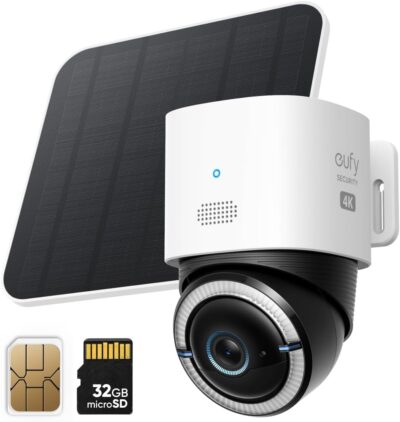
- Motorized pan and tilt
- 4G LTE and Wi-Fi
- Separate panel
- Memory-card recording; confirm selected contents
- Compatible active cellular data arrangement when operating over 4G
PROS
- Cellular access addresses sites without a usable router
- Wi-Fi support offers another connection option
CONS
- Viewing habits affect the service budget
- Remote placement can make recovery inconvenient
- Recording continuity needs mode-specific confirmation
Amazon customer rating
1,250 Amazon ratings
The eufy 4G LTE Cam S330 becomes interesting where the usual home-camera assumption fails: there may be no usable router at the site. A building project, an isolated gate or a property awaiting utilities creates a different buying problem from watching a front door beside an established network. Cellular connectivity can address that communication gap, but it adds a service and operating plan rather than removing every dependency.
This review examines the single-camera solar offer B0CZ6KW4NP, in the T86P2 family. It is not the eufyCam S330 two-camera HomeBase system. The assessment draws on manufacturer information and supplied customer accounts; we have not physically tested this camera or measured its cellular consumption.
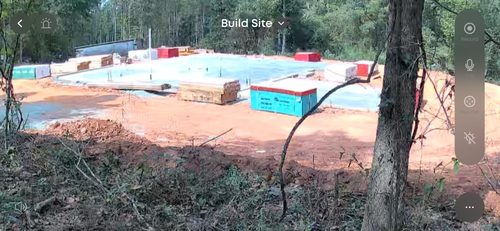
A construction site explains the appeal better than a feature list
Two supplied owners describe wanting to watch building work at locations without ordinary electricity or Wi-Fi.
The documented cellular and Wi-Fi capability is a meaningful distinction when the installation benefits from both options.
- That is a concrete reason to investigate this camera.
- It does not require stretching the home router's range merely to make a Wi-Fi-only camera reach a distant location.
The manufacturer supports both Wi-Fi and 4G connectivity for this model. That gives it potential flexibility as a site's infrastructure changes. However, a connection option only helps when its supported service is active and usable where the camera will be mounted.
Before ordering, identify the actual site rather than relying on a general coverage impression. Consider the planned mounting point, obstructions and who will retrieve the camera if setup or recovery requires a visit. A remote-monitoring purchase should account for those visits as carefully as the first successful picture.
Budget attention as well as data
Frequent live checking is an understandable habit when a camera makes a previously invisible site accessible.
- It can also change the workload substantially.
- One customer describes leaving the view running and exhausting the included data sooner than expected.
- That is an account of a particular usage pattern, not a forecast for every owner.
A quick check and an open stream are different activities
Decide whether the normal routine is an occasional inspection, responding to an alert or keeping a feed open while work happens.
- Those are different data and energy demands.
- Do not choose a plan solely because another reviewer reports a low monthly cost without matching that person's usage.
Several authorized viewers can change the total
If more than one person will inspect the site, agree on the intended workflow.
- Shared access is useful, but the combined viewing pattern may differ from the purchaser's original estimate.
- Observe real consumption before treating the first plan as a settled long-term cost.
Keep three kinds of continuity separate
| Question | What must actually be established |
|---|---|
| Will the camera stay powered? | A workable charging balance and a maintenance plan |
| Will I be able to reach it remotely? | Supported connectivity, active service and usable coverage |
| Will the needed footage be retained? | The correct recording configuration, functioning storage and successful retrieval |
The manufacturer's sales language emphasizes continuous access and also displays a 24/7 recording badge.
A successful connection does not establish a gap-free archive. Confirm the exact recording mode and selected media contents.
- That badge alone is not sufficient to specify an uninterrupted recording arrangement for every operating mode.
- Its S330 motion-detection guidance describes settings that can suppress repeated events to preserve battery life.
- Confirm the precise recording behavior required for the planned configuration rather than translating a power or connection claim into a guarantee about the saved timeline.
If uninterrupted recording is a purchase requirement, establish that support explicitly for the exact mode and hardware before choosing this camera for that job. The recommendation here is about remote-site access, not certification of a gapless archive.
Plan the second visit before the first mounting
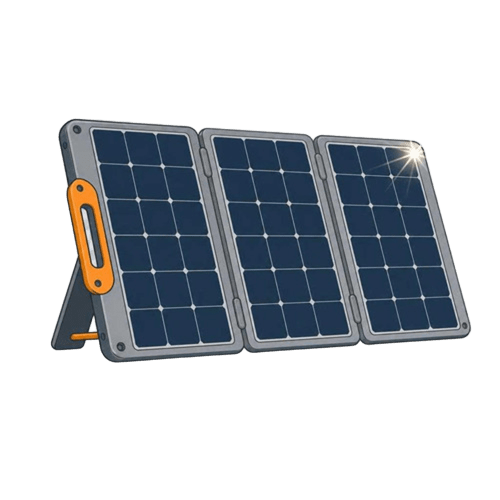
A solar panel reduces dependence on an outdoor power outlet, but the equipment still needs a suitable position and a way to reach it.
Coverage, the mobile account and physical access remain responsibilities even when the camera also supports solar charging.
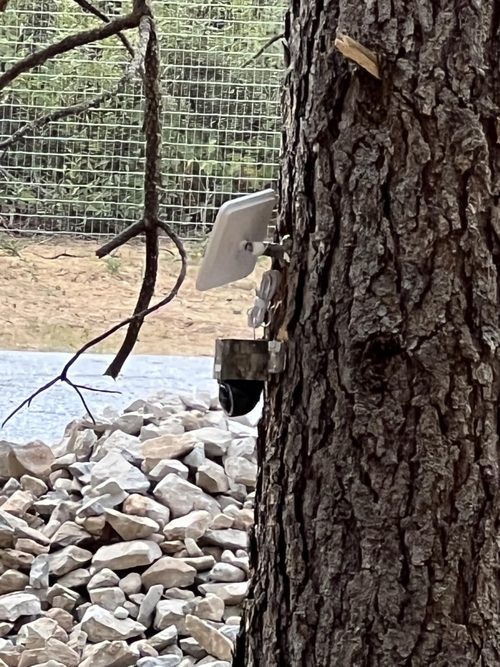
- One supplied trail-camera account mentions making a field trip to reset the device.
- That does not prove a common defect; it demonstrates why recovery access belongs in the plan.
Avoid copying improvised mounting methods from reviews. Use the supported equipment and instructions for the chosen surface, then check the view and panel position independently. Do not choose an inaccessible location simply because it looks harder to disturb.
Where the site is far away, keep a record of the selected model, service arrangement and setup details in a secure place available to the authorized owner.
A future support conversation is easier when the problem can be described precisely instead of beginning with a guess about which camera or SIM was installed.
Validate the recording settings against the actual activity
The official motion-detection troubleshooting guidance matters because a setting chosen to preserve battery can change which repeated events are recorded. Read the behavior of the selected mode, then inspect the saved result for the kind of activity expected at the site.
For a building project, a useful check might involve somebody arriving, pausing near the entrance and returning to a vehicle.
- Determine whether the saved sequence supplies the context needed later.
- An alert arriving or a camera turning toward movement is not the same as retaining the relevant action.
Owner complaints about zones, detail and missed moments should be treated as questions to investigate, not measured comparative results. Different sites, added HomeBase equipment and settings make it inappropriate to attribute every account to the selected standalone arrangement.
Choose it for access that the site otherwise lacks
The 4G LTE Cam S330 deserves a shortlist place when cellular connectivity solves a genuine location problem, the service requirements are acceptable and access for maintenance is practical.
It is less persuasive when a straightforward home-network installation already meets the need, or when the purchase depends on an unconfirmed recording mode.
The correct comparison includes the camera, panel, service and realistic operating routine. Make those work together before treating remote access as dependable oversight of the site.
Pros & Cons Analysis
Based on documented specifications and owner feedback
Pros
- Monitoring can begin before the property has its normal network — A site awaiting utilities is a meaningful use case for cellular connectivity: extending or borrowing a neighboring router may be impractical.
- Changing site infrastructure need not make the connection choice permanent — The model's support for both Wi-Fi and 4G gives the owner more than one communication option to investigate as the property changes.
Cons
- The convenience of checking frequently can undermine the assumed running cost — An owner who leaves a live view open is using the camera differently from someone who responds to a few alerts.
- A minor recovery task can become a substantial trip — The appeal of a remote view is strongest when visiting the site is inconvenient, but that same distance makes physical recovery more consequential.
- A broad sales badge does not define the footage available in every configuration — The current sales page uses strong continuity language, while model-specific support explains that battery-preserving settings can suppress repeated events.
S330's network flexibility is useful only if the recording fits too
The 4G LTE Cam S330 deserves attention when both cellular and Wi-Fi options have a meaningful role at the site. Its separate panel and movable view add installation choices, but connectivity is the distinguishing purchase case.
- Communication decision
- Check compatible cellular service and the intended Wi-Fi arrangement.
- Evidence decision
- Confirm the exact recording behavior and media configuration independently of those connection choices.
- Power decision
- Keep the panel exposed and the camera accessible; solar support is not a guarantee of a gapless archive.
Compare it with Go PT Ultra when deciding whether cellular-only operation is sufficient.
Frequently Asked Questions
Can the cellular S330 also connect using Wi-Fi?
Yes. eufy's support identifies both Wi-Fi and 4G connectivity for this model. Confirm the behavior of the actual configuration you intend to use.
Is cellular data included indefinitely with this S330?
Do not assume that. Check the selected SIM arrangement, any introductory allowance and the cost of continuing service for your actual usage.
Can I budget S330 data from another customer's monthly bill?
Not reliably. Service prices and viewing habits differ. Frequent live viewing and several authorized viewers can change the required allowance.
Does this 4G camera remove every reason to revisit a remote site?
No. Maintenance, configuration recovery or charging problems can still require access. Plan a practical way to reach the equipment.
Does the S330 sales badge establish continuous recording in every mode?
No. Confirm the exact supported recording configuration. Model-specific support describes battery-preserving settings that can suppress repeated events.
Should a HomeBase-related S330 complaint be treated as a standalone result?
No. Added base equipment changes the arrangement. Keep those reports separate when evaluating the selected camera's standalone cellular use.
Technical Specifications
| Model family | eufy 4G LTE Cam S330 / T86P2 |
|---|---|
| Amazon offer | B0CZ6KW4NP |
| Selected camera count | 1 |
| Connectivity class | 4G LTE and Wi-Fi |
| Camera arrangement | Motorized pan and tilt |
| Solar arrangement | Separate panel |
| Local recording | Memory-card recording; confirm selected contents |
| Offer-specific requirements | Service requirement: Compatible active cellular data arrangement when operating over 4G |
| Advertised video resolution | 4k |
| Advertised weather rating | IP55 |
| Night vision type | Not established for this selected offer |
| Motion / alert method | Motion Only |
| Mounting method | Wall Mount |
| Audio support | Not established for this selected offer |
| Advertised viewing angle | 360 degrees |
| Video format | MPEG-4 |
| Operating environment | Outdoor |
| Compatible device class | iOS, Android |