aosu C9C2 Solar Camera Review
At a Glance
KEY FEATURES
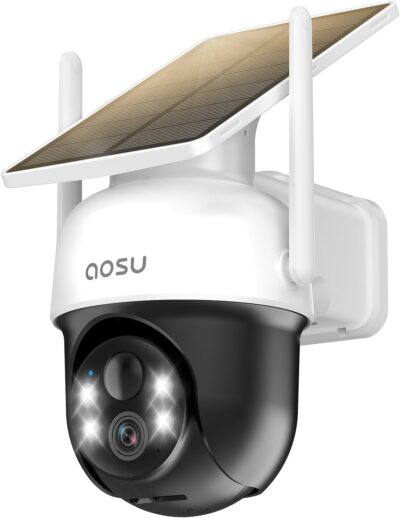
- Motorized pan and tilt
- 2.4GHz Wi-Fi
- Attached fixed panel
- Memory-card recording; confirm compatible card and contents
PROS
- Single-camera entry into a movable outdoor view
- Attached panel keeps installation components together
- Local recording can avoid a mandatory cloud purchase
CONS
- Camera and panel placement are coupled
- Tracking does not establish complete event capture
- Outdoor recording and maintenance need an access plan
Amazon customer rating
5,034 Amazon ratings
The aosu C9C2 is worth considering when one outdoor camera needs to look around a yard without the owner buying a complete camera-and-recorder package. The selected offer is the single-camera B0CHB2TH2V. Its attached solar panel keeps the installation together, while the camera below can move. Those two characteristics are easy to confuse when a listing describes a fixed panel.
The useful question is not how much of the property you can see by moving the camera in the app. It is whether the camera saves the event you care about while you are doing something else. A wide range of movement is helpful for checking a parked vehicle or looking down the side of a house, but it does not create several independent viewpoints.
This assessment combines the selected listing with supplied customer accounts, not hands-on testing. Accounts with unclear variants are not used to establish specifications, and reported successes or problems are not converted into a failure rate.
Draw the route before choosing the sunny wall
Imagine a side yard with a gate at one end and parked vehicles at the other.
A manageable first installation is the stronger C9C2 use case. Its motorized view does not replace planning what should stay visible.
- The camera can be useful for looking toward either area.
- Before choosing a fixing point, decide which route matters when nobody is watching the feed.
- A person approaching the gate should not become an afterthought because the camera was last used to inspect a vehicle elsewhere.
Mark that priority scene first, then consider whether the same position suits the attached panel and the wireless connection.
These are separate requirements even though the equipment shares a mount.
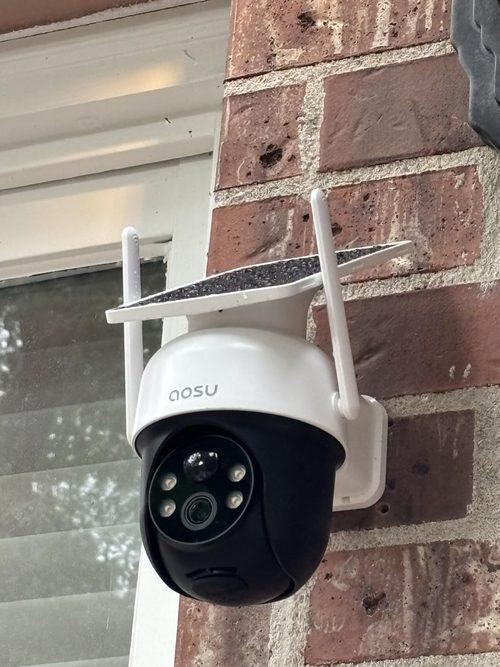
This is where the C9C2 differs from a camera with a separately positioned panel. Its tidy arrangement reduces the number of things to place, but also removes some placement freedom. Check the selected mounting instructions before assuming that an accessory or extension will solve an awkward site.
Three jobs that the moving head must not confuse
Looking somewhere on request
Remote movement lets a person redirect the view in the app.
The required camera position also needs to suit the fixed attached panel. A shaded viewpoint deserves another placement or design.
- That is useful when checking whether a vehicle has arrived or examining a different part of the garden.
- It remains a deliberate action by somebody who is already aware of the question.
- A successful live check does not establish what the camera recorded beforehand.
Following a detected person
The listing advertises automatic human tracking.
- Treat it as a way to follow an event once detection occurs, rather than proof that every person will be detected immediately.
- A customer who likes the tracking and another who reports a missed approach may both be describing their own installations accurately.
- Neither account supplies a controlled comparison of distance, settings or mounting geometry.
Being ready for the next arrival
After movement ends, inspect the actual view and subsequent saved clips.
- Do not assume a particular return position, delay or patrol routine without checking the supported controls.
- If two entrances must remain visible independently, a second suitably placed camera can address a problem that more panning cannot.
- The distinction is simultaneous coverage, not simply the ability to turn farther.
A picture in the app is only the middle of the job
One supplied owner account describes seeing a vehicle in the live view without reliably receiving the expected departure event.
- Another finds the movement useful for checking vehicles and a side yard.
- Taken together, these accounts suggest a practical acceptance exercise: follow an ordinary journey through the scene and inspect the saved result, rather than judging the installation solely from a sharp live picture.
Look for the part of the journey that explains what happened.
Does the clip include the approach, or only somebody already standing near the camera?
Can you distinguish entering from leaving?
Does a notification lead to the relevant recording?
These are questions to investigate in the actual installation, not features that can be certified from the camera's resolution label.
Night checks deserve their own attention because a useful daytime composition can behave differently with illumination, reflections and moving subjects.
Avoid turning an owner's praise for image clarity into a promise of plate or face identification at a particular distance.
No such controlled measurement is established by the material used here.
Buy a recording route, not just a camera body
The selected material identifies local recording, and owner accounts describe using a memory card while cloud storage is optional.
Confirm saved approaches and charging at the first position before assuming additional units will solve the rest of the property.
- Confirm a compatible card and whether it is included in the exact offer.
- The convenience of avoiding a mandatory cloud recording purchase is meaningful only after you have configured and checked the local recording path.
Without a paid plan, test the functions you actually need: find an event, play it back and save a usable copy.
Do not infer that every advanced app feature is free simply because basic local storage is available.
Nor should a camera from this family be assumed to join an aosu base station merely because another aosu kit includes one.
Camera-local storage also puts the recording medium at the outdoor device. Consider that location when deciding how important off-device retention is for your use. A supported cloud option or another system architecture may serve a different need; neither should be assumed to be included in this single-camera purchase.
What the longer owner accounts add to the decision
The more informative feedback describes circumstances rather than just satisfaction.
- One customer reports that their camera positions have a reasonably clear path toward the router.
- That is useful context, not proof that the same connection will work through a different property's walls.
- The selected listing calls for 2.4GHz Wi-Fi, so this is not a cellular solution for an isolated site without an appropriate network.
Another account describes a spotlight problem, troubleshooting and a replacement. It is reasonable to learn from that experience that access for servicing matters. It is not reasonable to promise the same support outcome, diagnose a fleet-wide defect or assume a firmware update permanently resolves similar symptoms.
Charging stories are similarly conditional.
The account discussing several cloudy days also reports a declining battery level.
More enthusiastic reports of sustained charging do not cancel that observation; the sites and usage differ.
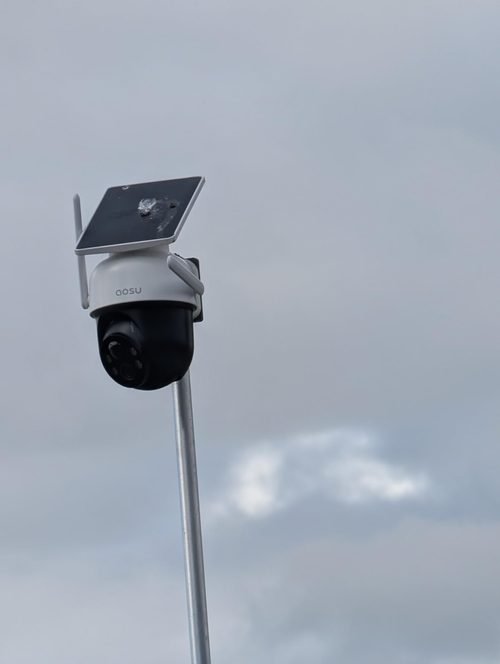
Plan a way to reach the unit if cleaning, charging or troubleshooting becomes necessary, rather than treating solar power as a promise of maintenance-free ownership.
Keep the first installation deliberately small
The strongest purchase case is one defined home scene with usable sunlight and Wi-Fi, where occasional remote looking and person-following are helpful additions. Evaluate that installation before treating the same model as the answer for every boundary of the property.
If the first position works, expanding can be a separate decision about another scene.
- If it fails because the required view is shaded, the network is unsuitable or two directions must be watched at once, buying more identical cameras without changing the layout does not address the cause.
- The C9C2 is a compact way to add a movable viewpoint, not a substitute for deciding what evidence each position must preserve.
Pros & Cons Analysis
Based on documented specifications and owner feedback
Pros
- A small purchase can answer a specific viewing question — The selected one-pack lets a buyer address a particular yard or approach without committing to the equipment and placement of a whole-property kit.
- An attached charging surface reduces separate mounting decisions — Keeping the solar panel on the camera assembly can simplify a suitable wall installation because there is no separate panel position to coordinate.
- The basic recording decision need not start with a subscription — Local recording provides an alternative starting point to purchasing cloud storage for saved events.
Cons
- A convenient combined mount can be the wrong fit for a shaded approach — The panel's fixed relationship to the camera makes sunlight and camera placement interdependent.
- Watching the motor follow someone can conceal a weak recording start — Tracking demonstrations show what happens after a subject is detected, not necessarily the beginning of the saved evidence.
- The recording medium and service work remain outside at the camera — A local memory card keeps the recording path simple, but places that medium at the installed device.
C9C2 is a first-position camera, not an entire coverage plan
Keep the first installation manageable
A single C9C2 can make sense for a defined home scene where 2.4GHz Wi-Fi and its attached panel suit the location. Pan and tilt offer a way to inspect around that view, not simultaneous evidence from every direction.
Before buying more units, establish two things with the intended setup: whether approaches are saved usefully, and whether the practical camera position also suits charging.
Choose another layout if the best view is shaded or several separated approaches must remain visible together. Those are installation constraints, not problems that a rotating lens automatically solves.
Frequently Asked Questions
Does fixed panel mean the C9C2 lens cannot move?
No. The fixed description concerns the solar panel. The selected C9C2 is a movable camera with advertised human tracking.
Can I use the C9C2 at a site with only a cellular SIM?
Not as a standalone cellular camera. The selected offer specifies 2.4GHz Wi-Fi and needs an appropriate wireless network.
Is C9C2 local recording the same as buying an aosu base kit?
No. This one-camera offer is not a base-station kit. Do not infer compatibility with a different aosu recorder from the shared brand.
Should I buy a memory card for this C9C2 offer?
Confirm the selected contents and supported card specification before ordering. Owner accounts describe using a separately supplied card; do not assume one is included.
What can C9C2 tracking tell me about a missed arrival?
Tracking follows a detected subject. It does not by itself prove the camera captured the start of an approach. Inspect saved clips from the actual route.
Will turning the C9C2 solve a shaded panel position?
Redirecting the camera view is not a substitute for a suitable solar mounting position. Assess sunlight at the attached panel as well as the scene you need to see.
Technical Specifications
| Model family | aosu C9C2 / C9C2CA11 |
|---|---|
| Amazon offer | B0CHB2TH2V |
| Selected camera count | 1 |
| Connectivity class | 2.4GHz Wi-Fi |
| Camera arrangement | Motorized pan and tilt |
| Solar arrangement | Attached fixed panel |
| Local recording | Memory-card recording; confirm compatible card and contents |
| Offer-specific requirements | Included base station: Not listed in this selected one-camera offer |
| Advertised video resolution | 2k |
| Advertised weather rating | IP65 |
| Night vision type | Not established for this selected offer |
| Motion / alert method | Motion Only |
| Mounting method | Wall Mount |
| Audio support | Two-way audio advertised |
| Advertised viewing angle | 360 degrees |
| Video format | MPEG-4 |
| Operating environment | Outdoor |
| Compatible device class | Smartphone |