
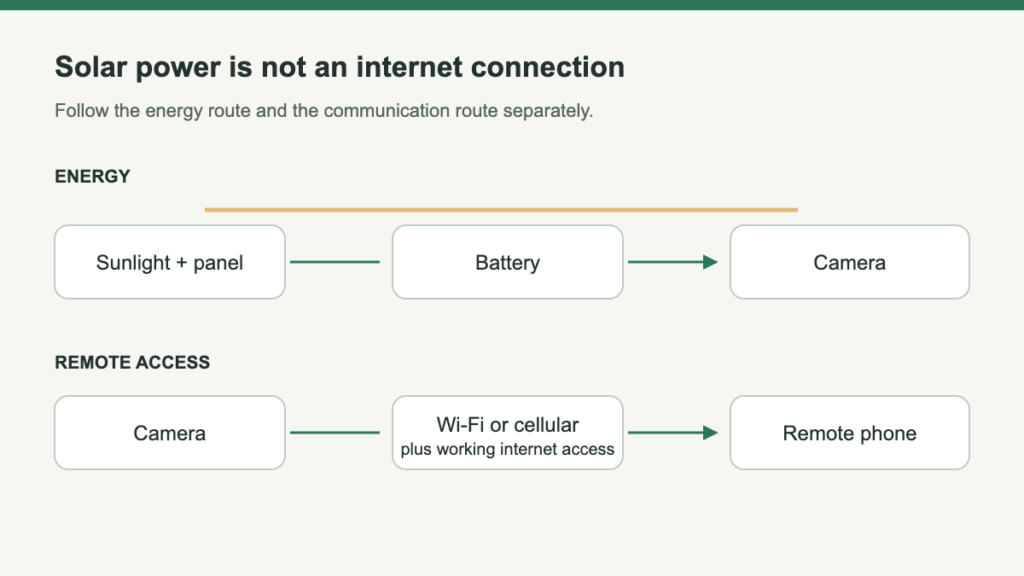
Some solar security cameras need Wi-Fi for remote access; others use a cellular data connection. Solar describes how the battery is charged, not how video reaches your phone. A camera may also save footage locally without maintaining a remote connection, but that does not mean you can watch it from anywhere.
Before choosing a camera, separate three jobs: supplying energy, recording an event and communicating with the person who wants to see it. A package can solve one of those jobs while leaving another unresolved. That is why “wireless,” “solar” and “works without internet” are not sufficient buying specifications by themselves.
Trace the route from the property to your phone
Camera → property network → internet → remote viewer. A phone on mobile data does not supply a missing connection at the camera’s location.
Camera → supported mobile service → remote viewer. Coverage, activation and a data arrangement remain necessary; an included SIM does not establish free ongoing service.
eufy’s 4G LTE Cam S330 supports Wi-Fi and cellular. Match the full model and regional hardware; other eufy cameras called S330 are not automatically hybrid devices.
Choose by what is available at the camera position
| Site situation | Connection to investigate | Important limit |
|---|---|---|
| A house with usable Wi-Fi at the intended mount | A compatible Wi-Fi camera | Indoor coverage does not prove a working outdoor connection |
| No home network, but suitable mobile coverage | A compatible cellular camera and data service | Carrier support and regional hardware must match |
| No dependable connection of either kind | A camera explicitly supporting the required local recording workflow | Local footage does not provide immediate remote access |
The third option deserves particular care. A camera that can keep a local record during an interruption may still require an online activation process and a connection for configuration. Do not assume that a device marketed as an offline recorder can be opened, installed and managed indefinitely without any network setup.
Distinguish a broadband outage from lost Wi-Fi
Reolink’s battery-camera guidance distinguishes these two interruptions. Its described behavior assumes a configured camera, usable card and sufficient battery power.
Local card recording can continue, and local viewing and playback remain available. Remote access and internet-delivered alerts lose their required route.
Local card recording can continue, but local network viewing and playback are unavailable too.
These are model-guidance examples, not a promise for every camera. Later inspection and immediate remote response are different requirements; solar cannot restore a missing connection.
Check a cellular offer beyond its included SIM
- Resolve compatibility. Check country, bands, permitted carriers and whether a different SIM is allowed. Supported network selection does not mean any SIM will work.
- Resolve the account. Check activation, trial allowance, renewal, balance reporting and behavior when data runs out.
- Resolve the workload. Brief checks and frequent high-quality viewing differ. A vendor’s sample month is not your guaranteed usage.
- Resolve the visit. Assign someone who can attend to a SIM, supported reset or manual charge when necessary.
Use a connection check that matches the intended job
- Use the camera at the proposed mount. Follow its exact band and network instructions; the phone’s signal display is only a clue.
- Check the intended remote route. For Wi-Fi, test from outside the home network. For cellular, activate the supported service at the site.
- Retrieve an event. Confirm saved footage and notifications reach the intended person.
- Document outage behavior if required. Use a reversible noncritical check. Distinguish internet loss from local-network loss, then restore normal operation.
Choose the communications route before the solar kit
A Wi-Fi model is a candidate where the actual camera connects at the intended mount. Confirm remote access and saved-event retrieval, not just a phone’s signal reading.
Without that network, investigate a supported cellular arrangement and its recurring service. A local-only archive can serve later inspection, but it does not provide the same remote response.
Finish the choice in this order: connection, recording, then charging position. The cellular shortlist addresses the off-network branch; the placement guide helps check the physical installation after the communications question is settled.
Leave a Reply