
Solar Power Picks logo with sun, solar panel, and green energy icon

  • Home
  • Reviews
  • Best
    • Best portable power stations
    • Best Solar Panels
    • Best Solar Generators
    • Best Solar Charge Controllers
    • Best Solar Batteries
  • Guides
    • Portable Power Stations Guides
    • Solar Panels Guides
    • Solar Generators Guides
    • Solar Charge Controllers Guides
    • Solar Batteries Guides
  • Comparisons
    • Portable Power Stations Comparisons
    • Solar Panels Comparisons
    • Solar Generators Comparisons
    • Solar Charge Controllers Comparisons
    • Solar Batteries Comparisons
  • Calculator
Guides

Solar Camera Missing Motion Events? Find Which Stage Failed

2 min read
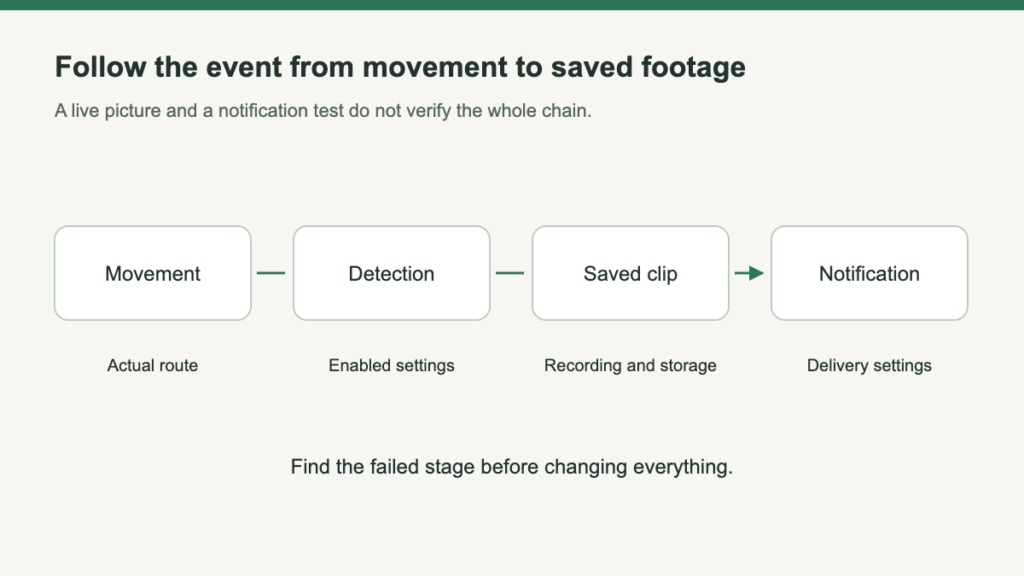
A four-stage chain shows movement, detection, saved clip and notification, with separate checks at each stage.

Table of Contents

“The camera missed it” can describe several different problems. Perhaps no phone notification arrived, perhaps no recording exists, or perhaps the clip starts after the important action. Check what is actually missing before raising every sensitivity setting.

Look for the clip before diagnosing the alert

Clip saved; no phone alert

Preserve the recording. Check notification permissions, schedules and supported alert configuration before treating camera angle as the first suspect.

No saved clip

Identify the intended local or cloud storage path and use the exact hardware and firmware instructions. TP-Link’s guidance notes that available functions vary by version.

Trace three stages separately

  1. Detection

    Did the enabled configuration identify the activity?

  2. Recording

    Was the intended storage path enabled and usable?

  3. Delivery

    Did the intended person receive the alert or retrieve the event?

A failure at one stage does not establish failure at all three. Receiving an alert does not prove that useful footage was retained.

A late beginning is a separate symptom: Inspect the sequence, not only its final image. A visitor already at the door is different evidence from the approach; live view does not measure the recording start.

Repeat an ordinary journey through the scene

  1. Use an ordinary route. Ask a household member to walk normally through entry, pause and departure—not simply wave near the lens.
  2. Review relevant lighting. Repeat under the conditions that matter to this installation.
  3. Change one supported factor. Record the outcome before changing another setting or placement factor. There is no universal sensitivity value or detection distance.

Escalate with a reproducible missing event

Keep the problem specific enough to test: no detection, no saved clip, a late beginning, or no delivered notification. These are different symptoms and should not all be described as “the camera missed motion.”

Preserve the example
Save the approximate time, model and hardware version, enabled settings and any available clip.
Repeat one ordinary route
Change one supported factor at a time, then compare the retrieved result under relevant lighting.
Protect the archive
Keep important recordings before following any reset procedure, and do not share account passwords with support.

If the needed beginning or interval remains absent, reassess the recording method as well as placement. The success criterion is usable saved evidence, not a larger notification count.
Frequently Asked Questions

Does a missing phone alert mean no video was saved?

Not necessarily. Look for the recording first, then investigate notification delivery if the clip exists.

Can an alert arrive without a useful saved clip?

Yes, treat detection and recording as separate checks. Verify the intended storage path and inspect the actual saved event.

How should I investigate a clip that starts too late?

Repeat the ordinary approach and review the beginning of the recording. Do not substitute a live-view demonstration for the saved-event check.

Should every sensitivity setting be increased together?

Change one supported factor at a time and record the result. Several simultaneous changes make the outcome harder to explain or reproduce.

Is waving near the lens enough to validate an entrance camera?

No. Test the normal route, pause and departure under relevant lighting, then review what was retained.

What should I save before asking support about missed events?

Keep representative clips, approximate times, model/version details and configuration notes. Preserve important footage before any reset advised by support.

Share this article

Twitter Facebook LinkedIn Email

Leave a Reply Cancel reply

Your email address will not be published. Required fields are marked *

Related Articles

Series and parallel solar panel wiring layouts connected to a charge controller

Series vs Parallel Solar Panels for a Charge Controller

Read More

Solar maintainer, trickle charger or recovery charger?

Read More
120-volt and 240-volt portable power station circuit planning scene

Portable Power Station 120V vs 240V: Match the Right Circuit

Read More

About Solar Power Picks

Portable Solar Power, Backup Power, and Off-Grid Gear Guides

Your trusted source for honest, in-depth product reviews and comparisons.

Quick Links

  • Best Picks
  • Reviews
  • Guides
  • Comparisons
  • Calculator
  • Privacy policy
  • Favorites

Categories

  • Portable Power Stations
  • Solar Batteries
  • Solar Battery Maintainers
  • Solar Charge Controllers
  • Solar Generators
  • Solar Panels

© 2026 Solar Power Picks. All Rights Reserved.

We may earn a commission when you purchase through links on our site. Learn more