
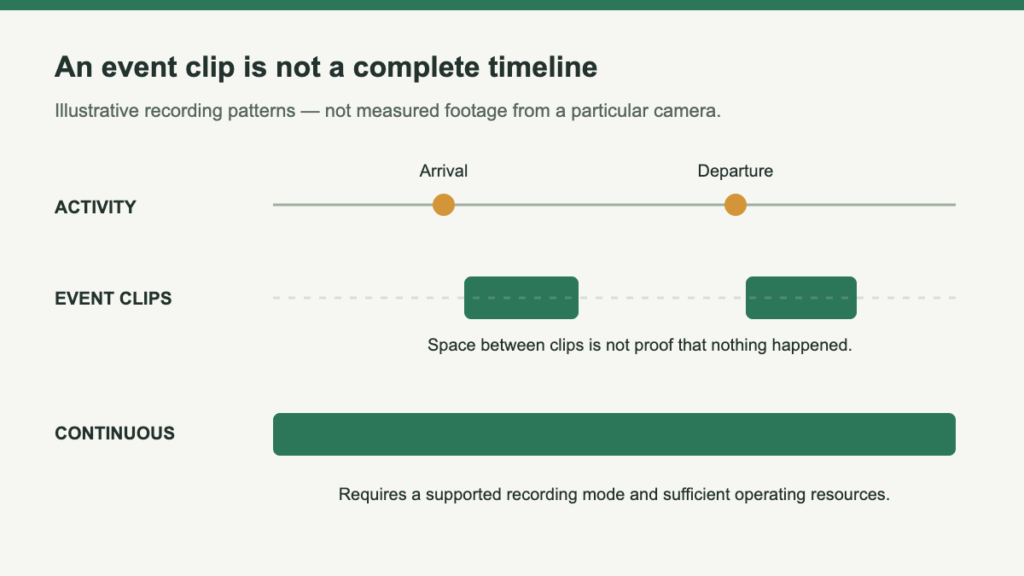
A camera that stays charged all day does not necessarily record all day. Solar charging, battery endurance and recording mode describe different things. Before buying a camera to investigate an incident, decide whether you need selected event clips, footage from just before a trigger, or a record covering a longer period without waiting for motion.
The distinction matters because an attractive live image proves only what the camera can show at that moment. It does not tell you which earlier activity has been retained. Start with the recording you expect to find later, not the picture currently visible in the app.
Reconstruct one delivery in three ways
A vehicle arrives, someone pauses at the gate, and a package is left. Later it disappears. What can the archive actually explain?
Retain activity that meets the configured trigger conditions. Efficient to review, but an empty interval does not prove the scene was empty.
Add an interval before a detected event where supported. This can recover an approach, but does not fill all gaps between unrelated alerts.
Can preserve the selected period without relying entirely on triggers. Confirm when it runs, retained quality and what happens as power or storage becomes constrained.
Ask what the word “continuous” is modifying
Product descriptions sometimes discuss continuous power, continuous availability or continuous video in nearby sentences. Only the last is a claim about the footage retained. A solar accessory can help sustain a battery without changing the camera's recording capabilities.
Model-specific exceptions also matter. eufy's S220 guidance says the camera does not record 24/7, including when connected to HomeBase. Reolink documents continuous recording options for Altas PT Ultra, along with power-management conditions. Neither example is a rule for every battery camera or every camera from those brands.
Avoid another substitution: a large card or expandable recorder is not proof of a supported recording mode. Storage is a place to retain footage that the system creates. It does not necessarily make the camera create additional footage between events.
Follow the recording through a falling battery
Reolink’s documented Smart Battery Mode illustrates changing capture behavior on supported cameras. Check the exact thresholds, settings and firmware rather than treating this as a universal rule.
- Higher charge
Normal recording rate under the documented mode.
- Middle band
Reduced frame rate outside events can reduce temporal detail.
- Lower band
Continuous capture stops while triggered alarm recording remains.
Write the requirement before choosing a mode
- Name the period and purpose. Knowing someone approached a shed differs from reconstructing all loading-area activity during business hours.
- Name the missing context you cannot accept. If the beginning matters, investigate pre-recording. If the intervals themselves matter, an event-only system may be unsuitable.
- Name the retrieval route. Someone must locate and export the period before ordinary overwriting. Maximum capacity alone does not establish retention.
Verify the timeline, not a marketing demonstration
After setup, perform a harmless test matching the activity you care about. Review the saved result afterward rather than watching only the live feed. Check the beginning, transitions between clips and any intervals you expected to be covered.
Repeat the relevant check with the settings you intend to keep. If the camera changes behavior in a battery-saving mode, learn how the system reports that state and what it means for the archive. Do not deliberately compromise an essential monitoring period just to test a low-battery condition; use documentation or a controlled noncritical setup.
This is also the point to assess alert relevance. A busy scene can create many events without necessarily producing the particular evidence you want. More notifications are not automatically better recording, and an absence of notifications is not an independent assurance that the camera retained everything.
Define what must be present on the saved timeline
Choose event recording when a concise record of triggered activity answers the question. Investigate pre-recording when the missing beginning is the problem. Require documented continuous capture when the intervals between triggers are themselves important.
- Review a saved ordinary journey, including entry and departure.
- Check what battery-saving behavior changes in the archive.
- Find and export the relevant period before ordinary overwriting removes it.
The Altas PT Ultra review illustrates why recording schedules and battery-mode transitions must be assessed together. If gaps would defeat the job, reconsider the complete power and recording architecture; an included panel is not a guarantee of an uninterrupted record.

Leave a Reply