What are watts? Watts are the SI unit of power—the rate at which energy is used, transferred, or produced. One watt equals one joule per second. On a device label, watts help show how demanding that device is while it operates.
Read Watts as “How Hard Right Now”
A 10W lamp uses energy at a lower rate than a 1,500W kettle. The watt number does not reveal how long either operates or the total energy consumed. It describes the present rate.
| Device example | Illustrative power | What the number says |
|---|---|---|
| LED lamp | 10W | Low operating power |
| Router | 15W | Small continuous load |
| Laptop supply | 65W max | Supply ceiling, not always actual draw |
| Microwave input | 1,100W | High brief household load |
| Space heater | 1,500W | High steady resistive load |
Examples are not substitutes for exact labels or measurements. A laptop power supply marked 65W may draw less when the battery is full, while a cycling appliance changes demand over time.
Where the Watt Comes From
watts = volts × amps
Voltage is electrical potential; current in amps is the flow of charge. For suitable DC loads, 12V × 5A = 60W.
AC equipment can add power factor, waveform, and startup behavior, so simply multiplying label volts and amps may describe apparent power rather than measured real watts. Use the manufacturer’s watt input or appropriate measuring equipment when available.
Take a Label-Reading Walk
- Find input and output: a charger may list AC input and DC output separately.
- Find voltage: confirm whether equipment expects 120V AC, USB-C negotiation, or a specific DC voltage.
- Find current: note maximum amps and whether it applies to input or output.
- Find watts: prefer the exact published real-power value when available.
- Find time/energy: look separately for Wh, kWh/year, or battery capacity.
A “100W USB-C charger” describes its possible DC output. Its AC input and actual draw depend on the connected device and conversion efficiency.
Meet the Units Beside Watts
| Unit | Quantity | Plain-language role |
|---|---|---|
| Volt (V) | Electric potential | The required electrical pressure / level |
| Ampere (A) | Electric current | How much charge flows |
| Watt (W) | Power | Energy rate right now |
| Watt-hour (Wh) | Energy | Power accumulated across time |
| Kilowatt-hour (kWh) | 1,000Wh | Large energy totals and utility billing |
The U.S. EIA’s electricity measurement guide distinguishes watts from watt-hours, while NIST defines a watt as a joule per second. These are units, not product-marketing categories.
Use Watts to Check an Output Ceiling
When several devices run together, add their actual running watts. A station rated for 500W continuous should not be assigned a 600W steady load merely because its battery is large. Motor startup gets a separate check against surge watts and duration.
| Connected load | Running W | Decision at 500W source |
|---|---|---|
| Router + two lamps | 35W | Comfortable |
| Laptop + router + lamps | 100W | Comfortable |
| Small appliance group | 420W | Within rating; limited margin |
| 600W cooking load | 600W | Exceeds continuous rating |
| 200W motor with unknown start | 200W running | Startup still unknown |
Do Not Ask Watts to Answer a Time Question
Watts alone cannot tell runtime. A 100W load could run for ten minutes or ten hours. Multiply by operating time for watt-hours, then account for the source’s usable energy and losses.
The full unit comparison lives in watts vs watt-hours. If you already understand the units and need an inverter total, use how many watts do I need.
Catch Five Common Watt Mistakes
- ✅ “100W for two hours” equals 200Wh.
- ✅ 1kW equals 1,000W.
- ⚠️ Charger output watts are not automatically wall-input watts.
- ⚠️ A motor’s running watts do not reveal startup demand.
- ❌ Watts are not “watts per hour,” and W cannot be compared directly with Wh.
Three Meanings Hidden Behind a “Watt” Label
| Label location | Likely meaning | Question to ask |
|---|---|---|
| Appliance nameplate | Input or maximum input power | Is it steady, cycling, or peak? |
| USB charger front | Maximum negotiated output | What does the connected device request? |
| Power station AC spec | Continuous inverter output | What surge and duration are separate? |
| Solar panel nameplate | Rated output under test conditions | What reaches the battery today? |
| Power station input | Maximum accepted charging power | What voltage/current window applies? |
Context decides what the number means. “100W” on a panel, charger, appliance, and inverter describes four different interfaces.
Power Can Flow In or Out
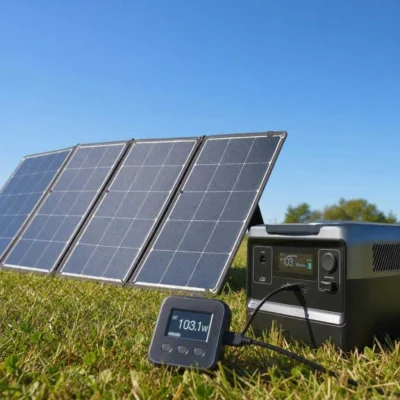
A station display may show 300W input from the wall and 120W output to devices at the same time. The net battery change also includes internal behavior; it is not always a simple screen subtraction. Input watts describe charging rate at that moment, while output watts describe load rate.
Why High Watts Often Mean Short Battery Time
A 1,500W heater can be within a 2,000W inverter’s output limit, yet it consumes 1,500Wh for every hour it remains on before loss. A 15W router uses the same energy only after 100 hours. “Can run” and “practical to run” are different judgments.
| Load | Power | Time to use 300Wh ideally |
|---|---|---|
| Router | 15W | 20h |
| Laptop | 60W | 5h |
| TV | 100W | 3h |
| Coffee maker | 1,000W | 18min |
| Heater | 1,500W | 12min |
Use the Unit Written, Not the Unit You Expected
- W = watts, a power rate.
- kW = 1,000 watts.
- Wh = watt-hours, energy.
- kWh = 1,000 watt-hours.
- A = amps, current—not watts unless voltage is included.
- Ah = amp-hours, charge—not watt-hours without voltage.
Capitalization matters less than understanding the quantity, but clean notation prevents mistakes when moving between labels, manuals, and calculations.
Use Watts to Build a Safe Simultaneous-Load List
Write each intended device on one row, record its operating watts, and mark whether it starts a motor or heating element. Add the loads that can truly run together, then compare that group with the station’s continuous output. Separately add the largest documented startup event to the background group that remains on.
| Load | Operating power | Scheduling note |
|---|---|---|
| Router | 15W example | Usually continuous |
| Two lights | 20W example | Can be reduced in daylight |
| Refrigerator | 140W running example | Keep separate startup evidence |
| Coffee maker | 1,000W example | Schedule while compressor rests |
| Space heater | 1,500W example | Usually reject from battery plan |
Measure Before Replacing the Example
The numbers above teach the method; they are not appliance specifications. Read the exact nameplate and manual, then measure representative operation with suitable equipment. A refrigerator’s display sample can miss startup and cycling, while a charger label may show its maximum input rather than what a nearly full device draws.
Record voltage with current when watts are not printed, note whether the value is input or output, and preserve the test duration. Once watts are connected to a named device, operating state, and time window, they become useful evidence instead of a floating headline.
Every watt number needs a subject and a moment: watts of what, measured or rated where, and under which operating condition?
A useful first exercise is to photograph three labels—a charger, a kitchen appliance, and the portable station—and annotate every W, V, A, Wh, input, and output value. Draw arrows showing which device supplies power and which receives it. This exposes category mistakes before any arithmetic begins.
If a label is unclear, do not infer that the largest printed number is ordinary consumption. Search the exact manual, identify the operating mode attached to the number, and measure the real device when appropriate. Good power planning begins with correctly named quantities, not with more precise multiplication.
Bottom Line: Watts Measure Power
Watts are the rate at which electrical energy is used or supplied. Read them as “how hard right now,” then use voltage, current, waveform, and startup information to judge compatibility.
When the question changes from “can it run?” to “how long?”, move to watt-hours and time. Keeping those jobs separate prevents most beginner power-station sizing errors.