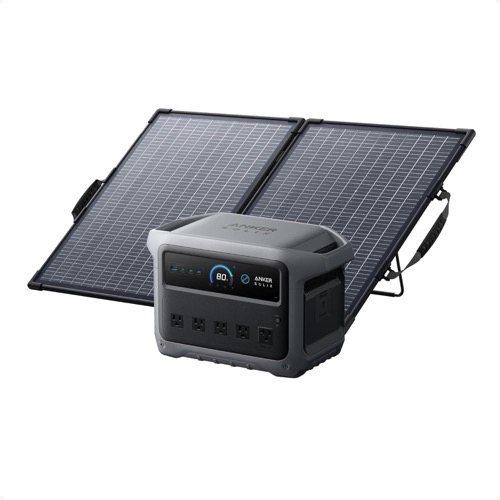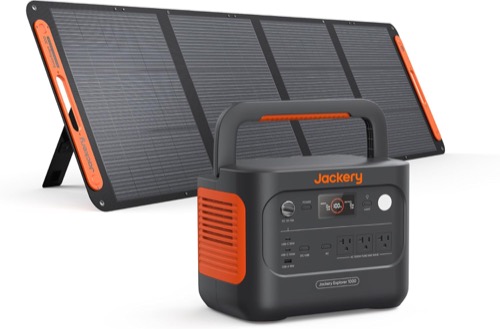
The Anker SOLIX C1000 Gen 2 and Jackery Explorer 1000 v2 are close in battery size but not in bundle behavior. Anker puts more of the budget into the station: 2,000W output, five AC outlets, a sub-10ms UPS specification, and a compact 100W panel. Jackery pairs a 1,500W station with a 200W panel, giving up some appliance headroom to recover energy faster from the equipment already in the box.
This is not a generic brand contest. It compares the exact US bundles attached to the product cards above: Anker C1000 Gen 2 with the PS100 Compact and Jackery Explorer 1000 v2 with one SolarSaga 200W bifacial panel. The template supplies the common 28-row specification table at the end, so the job here is to turn those figures into an ownership decision.
Read the Two Boxes Before the Two Logos
Anker’s box
1,024Wh LFP station, 2,000W continuous output, five AC receptacles, three USB-C ports, a car socket, app control, and one compact 100W bifacial panel.
Jackery’s box
1,070Wh LFP station, 1,500W continuous output, three AC receptacles, two USB-C ports, a car socket, app control, and one 200W bifacial panel.
The 46Wh capacity difference is too small to lead the decision. After conversion losses and a reserve, both belong to the same practical energy class. The meaningful asymmetry is that Anker has the stronger inverter while Jackery supplies twice the panel nameplate. If you compare station pages without checking the bundle, you miss the trade that shapes every off-grid day.
The Appliance Gate Favors Anker
Anker publishes 2,000W continuous output and 3,000W surge. Jackery publishes 1,500W continuous and the same 3,000W surge. That extra 500W of continuous ceiling matters when several ordinary loads overlap or when a single cooking or workshop load sits between the two ratings. It does not turn Anker into a universal appliance pass. Compressor startup, electronically controlled equipment, grounding behavior, and manufacturer restrictions still decide whether a particular device belongs on either station.
Outlet count is also operational, not cosmetic. Five Anker AC receptacles reduce the temptation to add a power strip, while Jackery offers three. More receptacles do not raise the total 2,000W or 1,500W ceiling; they only change how conveniently the available power can be divided.
The Included-Panel Ledger Favors Jackery
The bundle comparison reverses outdoors. Jackery’s 200W panel is paired with an estimated full solar recharge of roughly 7.5 hours under the manufacturer’s ideal conditions. Anker’s 100W panel implies about 12–14 peak-sun hours from empty. A normal day rarely delivers its nameplate wattage continuously, so the Anker bundle is better understood as a 100W maintenance and partial-recovery kit unless you add compatible array capacity.
| Ownership question | Anker C1000 Gen 2 kit | Jackery 1000 v2 kit |
|---|---|---|
| Panel supplied | 100W PS100 Compact | 200W SolarSaga |
| Station solar ceiling | 600W | 400W across two inputs |
| Approximate full recovery with included panel | 12–14 peak-sun hours, calculated | About 7.5 hours in stated ideal conditions |
| Growth path | More unused solar-input headroom | Better initial bundle balance |
Anker can accept the larger future array, but that is future hardware, not a benefit already in the carton. Credit the 600W ceiling only if you have priced a compatible array, checked cold-corrected voltage and current, and accepted the extra storage and setup. Otherwise Jackery wins the first-day recovery test.
Carry the Whole Kit, Not Just the Station
The Jackery station is slightly lighter: 23.8 lb versus Anker’s 24.9 lb. Add the supplied panel, however, and the result flips. Jackery’s panel weighs 14.33 lb; Anker’s compact panel is 7.7 lb. The published station-plus-panel totals are therefore about 38.1 lb for Jackery and 32.6 lb for Anker before cables and bags.
- Count carry events. A station that moves twice a year can prioritize capacity; a kit moved twice a day should prioritize separate-piece weight and folded dimensions.
- Measure the panel storage space. The lighter Anker panel is also much smaller when folded, while the Jackery brings more solar area.
- Pack the cable path. Do not assume a connector name means every panel, extension, or polarity is interchangeable.
Wall Charging, UPS Behavior, and Controls
Both stations are fast from AC. Anker specifies 0–100% in 49 minutes with HyperFlash enabled in its app. Jackery quotes about one hour in emergency mode and about 1.58 hours in standard mode. The fastest setting can bring extra fan noise, heat, or battery-management conditions, so compare the mode you will actually use rather than only the shortest advertised number.
Both also publish automatic backup behavior. Anker states under 10ms; Jackery states under 20ms. Those figures are a screening gate, not proof for a computer, network appliance, medical device, or other interruption-sensitive load. Check the load manufacturer’s power requirements and run a controlled outage, restoration, overload, and low-battery test. If interruption has serious consequences, use a system designed and commissioned for that consequence.
What Owner Evidence Adds—and Cannot Prove
The retained Amazon samples for both bundles contain useful descriptions of panel setup, charging, real loads, mobility, noise, apps, and support. They also contain failures and difficult support experiences. These are qualitative records, not controlled tests or population failure rates. Their best use is to reveal what to inspect during the return window: correct bundle contents, solar input under several conditions, fan behavior, app pairing, every outlet, and support response if something arrives wrong.
- Photograph model labels and serial numbers when the boxes arrive.
- Confirm the exact panel, solar lead, vehicle lead, and AC cable in the bundle.
- Run the intended highest continuous load and the most difficult startup load separately.
- Record panel watts in clear sun at more than one angle; do not treat one reading as a rating.
- Test app, UPS, AC restoration, and low-battery behavior while returns remain easy.
Choose by the Day You Need to Operate
Choose Anker for a busy powered workspace
The 2,000W ceiling, five AC outlets, multiple USB-C ports, and lighter complete carry suit overlapping devices and short setup cycles.
Choose Jackery for a solar-recovery weekend
The included 200W panel creates a more realistic day-to-day refill plan without immediately buying more solar hardware.
Choose neither for planned growth
If you expect added batteries, native 240V, or multi-day household coverage, start with a documented expandable system rather than forcing either 1kWh box upward.
For the larger Anker platform, read our F3800 + PS400 exact-kit review; it separates the 6,000W station capability from the one-panel bundle’s much smaller day-one solar recovery.
Price the Five-Year Ownership Ledger
The checkout total is only the first line. Add the hardware each operating plan actually needs. Anker’s 100W panel may prompt an immediate second-array purchase, while Jackery’s larger panel may require more carrying or storage equipment. Include compatible extension cables, protective cases, vehicle charging hardware, alternate panels, registration tasks, and the cost of a platform change if one kilowatt-hour later proves inadequate.
| Ledger line | Anker question | Jackery question |
|---|---|---|
| Day-one solar | Is 100W enough, or is the real purchase a larger compatible array? | Can the 200W panel be carried and deployed where you need it? |
| Warranty | Station is five years; confirm the exact panel term at purchase | Station and panel reach five years after registration under stated terms |
| Capacity growth | No published battery expansion | No published battery expansion |
| Cable inventory | Verify both supplied solar adapter paths and extensions | Verify DC8020 leads and any second-input plan |
| Exit cost | If 1kWh is too small, replacement—not an add-on battery—is the likely path | |
Warranty length should not be used as a reliability score. Read coverage, exclusions, shipping obligations, registration, and whether the retailer or manufacturer handles the claim. Owner records include both smooth and difficult outcomes; neither establishes a future claim result. Test early, preserve the invoice and serial number, and make any bundle-identity dispute while the return channel is still simple.
Also value unused capability at zero. Anker’s 600W solar ceiling has no economic benefit if the system will always use the supplied 100W panel. Jackery’s extra panel power has little value if every trip begins and ends near an AC outlet. A good ledger credits only capabilities connected to a documented use.
The Constraint Is the Verdict
Buy the Anker when the appliance and outlet gate is hardest to clear and you are willing to expand the solar array later. Buy the Jackery when the included panel has to restore a meaningful share of the battery during the trip and 1,500W covers the load list. If both pass, compare the exact delivered price, warranty registration steps, panel storage, and cable bill. The winner is the kit with the smaller unfunded gap—not the logo with the larger headline.