Reolink Argus PT Solar Kit Review: Turning the Camera Is the Useful Part
At a Glance
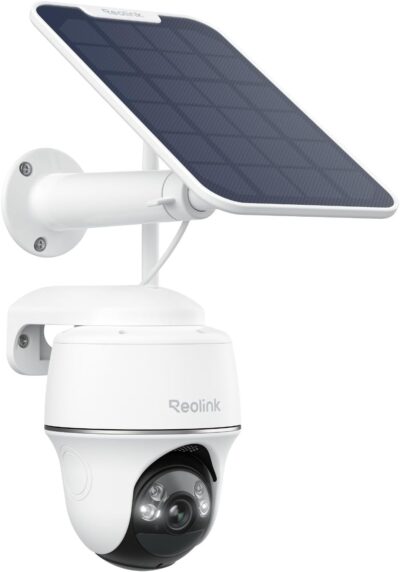
KEY FEATURES
- Motorized pan and tilt
- Wi-Fi
- Separate panel
- Memory-card recording supported
- Revision-specific; verify hardware against Reolink applicability guidance
PROS
- Remote redirection avoids repeated bracket adjustment
- Camera-local recording is a supported option
CONS
- Movement labels do not establish autonomous following
- Separated approaches cannot be watched simultaneously by one lens
- The chosen direction becomes part of the household routine
Amazon customer rating
9,704 Amazon ratings
One supplied owner explains the Argus PT's appeal more clearly than a broad coverage claim: they wanted to look toward two sheds without repeatedly adjusting the physical mount. That is a credible reason to buy a pan-and-tilt camera. It is also a narrower reason than expecting one device to watch both locations continuously and automatically.
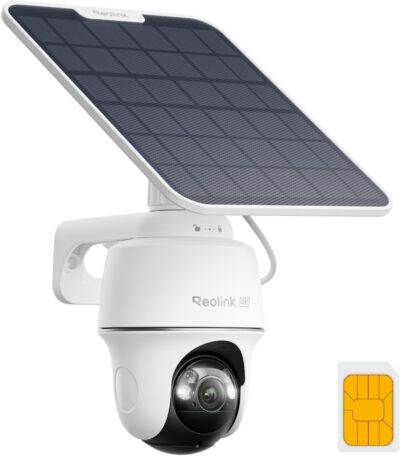
The captured offer, B07W6PXRR8, names Argus PT with a solar panel and advertises 5MP imaging. It is not the Argus PT Ultra. This review treats the ability to choose a viewing direction as the central purchase decision, while keeping exact-version questions separate from the features of other cameras in the same listing family.
Picture the two sheds before paying for rotation
Imagine a workshop door on one side of a yard and a storage shed on the other.
Pan and tilt can help inspect around one ordinary view. Decide what should remain in that view when nobody is steering it.
- You sometimes want to inspect each, but most of the time the workshop entrance is the priority.
- A steerable camera can make those occasional checks convenient without loosening its bracket whenever your interest changes.
The lens has a direction at any particular moment.
Its ability to turn does not provide two simultaneous recordings of separated areas.
If both shed entrances need independent evidence at the same time, two properly positioned cameras may suit the job better than one movable viewpoint.
There is no need to dismiss pan-and-tilt control because of that boundary. It is useful for choosing a view and checking a different part of a scene. The mistake is assigning it the workload of several cameras without deciding which area remains important when the app is closed.
Three movement claims that should not be merged
| Capability being discussed | The buyer's actual expectation | What must be established |
|---|---|---|
| Manual pan and tilt | I can redirect the lens when I choose | App control and useful viewing positions |
| Returning to a saved view | I can get back to a chosen scene | Exact model and software support for that function |
| Following a moving subject | The camera turns without my commands | Explicit auto-tracking support for the selected hardware |
These distinctions are especially important with Argus names.
- Reolink's older Argus PT 2K FAQ excludes auto-tracking, but its current tracking documentation explicitly includes particular Argus PT hardware versions.
- The correct conclusion is not that every PT lacks tracking.
- It is that the hardware identifier must match the supported version; a listing's 5MP label alone does not establish that match.
A supplied reviewer identifies their purchase as the 5MP Argus PT and complains that it did not follow subjects as expected.
Their account illustrates a purchasing misunderstanding, not the capabilities of every current unit.
A confirmed tracking-enabled revision could serve a different need from manual inspection, but it would still offer one moving viewpoint.
Check the selected hardware before relying on either interpretation.
Make a viewing routine, not an imaginary patrol
For the two-shed example, consider a short operating routine:
Two separated scenes may justify two cameras. Movement alone does not supply simultaneous coverage.
- Aim at the entrance whose activity matters most when nobody is checking the app.
- Move the camera for an occasional inspection of the secondary area.
- Confirm the view again after that inspection; do not assume it returned by itself.
This is an editorial example, not a prescribed manufacturer patrol setting.
- Its purpose is to show where user involvement sits in the buying decision.
- If that involvement sounds unreasonable for your household, choose an arrangement whose normal behavior better matches the requirement.
The direction should survive a change of user
Someone else with access may steer the camera to see a pet or investigate a sound.
- A useful system should not depend on only one person remembering why a particular direction was chosen.
- Make the priority scene understandable to everyone who uses the camera, and verify the actual return behavior supported by your unit.
The bracket still defines the possible views
Motorized adjustment cannot see through a wall, around every obstruction or past a badly chosen mounting surface.
- Before fixing the camera permanently, consider both desired positions.
- A location that serves the workshop well may put the second shed behind an obstruction.
- Turning range alone is not evidence that the planned viewpoints are usable.
The clip you keep matters more than the view you can summon
The official Argus PT specifications describe triggered recording.
Check applicability to the exact hardware before treating tracking as part of the purchase.
- That makes it important to evaluate saved events, not just the ease of moving the live image.
- Being able to inspect a shed now does not prove that the relevant activity there was retained earlier while the camera faced somewhere else.
Local microSD storage is a supported option on the current product page. The captured package lists a camera, panel and bracket; it does not establish an included card. Confirm the contents and supported storage before treating the bundle price as the complete cost of keeping recordings.
One supplied owner reports buying another card after trouble with an initial one, while also praising clip saving and sharing.
The cause of that problem is unresolved, and the initial card does not prove inclusion in this particular offer.
The practical implication is simply to verify recording and export promptly, while installation decisions are still easy to change.
A panel helps only where the planned setup can use it
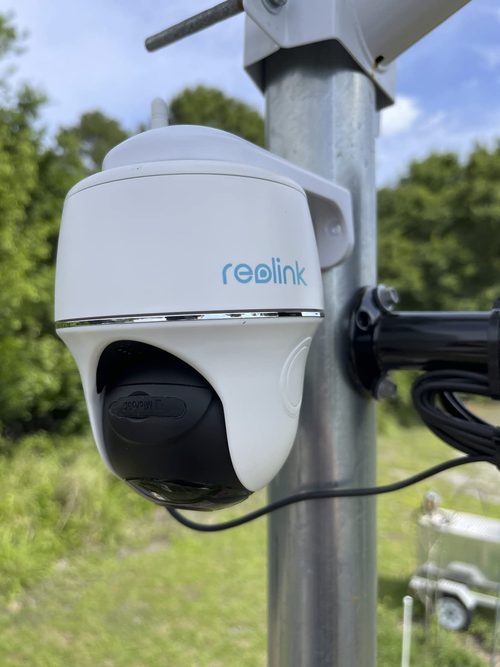
The kit's solar accessory is relevant when a convenient permanent supply is absent, but a camera that can turn still needs a workable installation position.
- Check network access and panel exposure at the actual site.
- The location that gives the widest sweep may not be the easiest place to maintain a connection or place the panel.
Favorable supplied reports describe charging through cloudy or rainy periods, but they do not establish an energy guarantee for a different yard, recording workload or season.
Avoid using someone else's apparently maintenance-free experience as a substitute for assessing your mounting arrangement.
Plan how to reach the camera if manual charging or other attention becomes necessary.
The current official page describes dual-band Wi-Fi. That provides a configuration choice, not a promise that a particular distant mount will work. Owner-reported range through walls is too installation-specific to be a useful guaranteed distance, so this review does not reproduce it as a recommendation.
Buy the movement you will actually use
The Argus PT deserves consideration when occasional redirection is genuinely useful and a single event-oriented viewpoint is enough most of the time. Its most persuasive owner example is practical rather than spectacular: looking toward another shed without repeatedly handling the mount.
If your intended purchase depends on automatic tracking, simultaneous coverage of opposite approaches, or an uninterrupted archive, do not treat the pan-and-tilt label as proof.
- Establish those requirements separately and verify the exact selected model.
- A simpler, correctly assigned monitoring job is a stronger reason to choose this kit than expecting its moving head to compensate for an undefined coverage plan.
Pros & Cons Analysis
Based on documented specifications and owner feedback
Pros
- Occasional inspections can change without physically moving the mount — The owner describing two sheds identifies a concrete advantage of remote pan-and-tilt control: the useful view can change when the owner's question changes.
- A basic event archive does not require building a recorder system first — The current manufacturer page supports recording on a card in the camera, giving a prospective owner an option that does not begin with a separate central recorder.
Cons
- Shopping by megapixels alone can select the wrong kind of motion control — The supplied 5MP owner account describes choosing a resolution option and later discovering that its behavior did not match expectations formed around the Ultra.
- One moving viewpoint can leave the other target outside the record — The ability to turn toward a second entrance is useful while inspecting it, but the first entrance may no longer be visible.
- Another person's live check can alter what the installation prioritizes — A movable camera creates an operational question that a fixed direction avoids: what scene remains selected after someone uses it?
Use Argus PT to inspect around a view—not abandon the important one
Argus PT fits occasional looking-around from one normal viewpoint. That is different from asking one lens to retain evidence from two separated approaches at the same time.
- Remote inspection is the priority
- Its movable view and separate panel can be useful, with the delivered revision and recording setup confirmed.
- Simultaneous coverage is the priority
- Compare two camera positions before spending more on movement.
Automatic-tracking expectations need a hardware check, not an assumption based on the Argus family name.
Frequently Asked Questions
Does every Argus PT hardware version support tracking?
Do not assume that. Reolink identifies specific compatible hardware versions. Match the delivered unit to the support guidance.
Can one Argus PT monitor two sheds simultaneously?
Turning between sheds is different from retaining both views at once. Independent simultaneous activity may require separate viewpoints.
What should happen after someone redirects the Argus PT?
Establish the supported return behavior or a household routine so the camera is left prioritizing the intended scene.
Is PT movement the same as optical zoom?
No. Movement, magnification and autonomous tracking are different capabilities. Check the selected model's documented features separately.
Does an Argus PT card eliminate the need to check saved footage?
No. Confirm recording configuration, the useful event and successful playback or export. Installing storage alone is not a complete acceptance test.
When is a fixed camera simpler than Argus PT?
When the required view never changes, a fixed direction avoids the need to manage where a movable camera remains pointed.
Technical Specifications
| Model family | Reolink Argus PT |
|---|---|
| Amazon offer | B07W6PXRR8 |
| Selected camera count | 1 |
| Connectivity class | Wi-Fi |
| Camera arrangement | Motorized pan and tilt |
| Solar arrangement | Separate panel |
| Local recording | Memory-card recording supported |
| Offer-specific requirements | Automatic tracking: Revision-specific; verify hardware against Reolink applicability guidance |
| Advertised video resolution | 1440p |
| Advertised weather rating | IP65 |
| Night vision type | Infrared |
| Motion / alert method | Motion Only |
| Mounting method | Wall Mount |
| Audio support | Not established for this selected offer |
| Advertised viewing angle | 360 degrees |
| Video format | MP4 |
| Operating environment | Outdoor |
| Compatible device class | Desktop |