Picture this: the power goes out, your fridge is warming up, your router is dead, and your phone is already low. You don’t want to drag a gas generator outside for a short outage. At the same time, a tiny battery bank won’t keep a refrigerator, CPAP, or Starlink setup alive for long.
The Jackery Explorer 1000 v2 isn’t trying to run your whole house. In practice, it works best as a quiet backup for essentials — fridge, CPAP, router, phones, laptops, fans, lights, and a few short bursts from kitchen or jobsite gear. That’s exactly where most owners seem happiest with it.
What Makes the Jackery Explorer 1000 v2 Different?
If you want quiet backup power for camping, RV use, CPAP, fridge support, or short blackouts, this power station works. For this Jackery Explorer 1000 v2 review, the biggest strengths are the fast AC recharge, strong 1,500W inverter, light-for-class weight, and long-life LiFePO4 battery. That said, the app can be flaky, solar charging is not as open as some rivals, and AC runtime needs realistic math because inverter losses are real.

Design and Build Quality
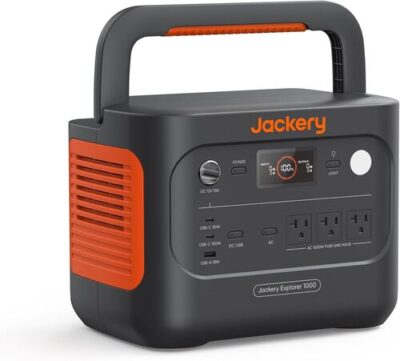
Jackery kept the Explorer 1000 v2 compact for its capacity. At 12.87 x 8.82 x 9.72 inches, it fits in a car trunk, on a kitchen counter during an outage, or beside a camp table without eating the whole surface.
The 23.8-lb weight is one of its best design choices. You still feel the solid heft when you lift it, but the folding top handle makes it easier to carry than boxier power stations with side grips. In practice, it’s comfortable enough for car camping, RV loading, and moving from room to room.
The display is also a highlight. Owners like seeing battery percentage, input watts, output watts, and time estimates without digging through the app. That said, runtime estimates can get optimistic with tiny AC loads, especially when inverter standby draw enters the picture.
| Design Detail | Real-World Take |
|---|---|
| Folding handle | Easy to carry short distances and folds flat for storage |
| Front-facing outlets | Handy during outages because cords stay visible |
| Compact body | Easier to place on counters, shelves, and camp tables |
| Display | Clear and useful, though runtime estimates need caution |
| Weight | Light for 1kWh LiFePO4, but not backpack-friendly |
Worth knowing, the port layout favors simplicity over maximum port count. You get the basics, but not a huge USB bank or a dedicated expansion port.
Battery Capacity and Real-World Runtime
The Jackery Explorer 1000 v2 portable power station has a 1,070Wh battery. In plain English, that’s enough to run small electronics for a long time, a CPAP overnight, a portable fridge for many hours, or a full-size refrigerator through a shorter outage.
Here’s the thing: AC runtime is not the same as the printed Wh number. When you use wall outlets, the inverter uses some energy to convert battery power to AC power. Low-watt AC loads can also lose extra runtime because the inverter stays on even when the device itself barely draws power.
| Device | Typical Power Draw | Estimated Runtime | Realistic with Margin |
|---|---|---|---|
| Smartphone charging | 10–15Wh per charge | About 60–85 charges | About 50–75 charges |
| Laptop | 50–80Wh per charge | About 11–17 charges | About 9–14 charges |
| Wi-Fi router | 10–20W | About 40–80 hours | About 30–55 hours |
| CPAP, no humidifier | 30–60W | About 14–27 hours | About 12–22 hours |
| CPAP, humidifier on | 50–90W | About 9–16 hours | About 7–13 hours |
| Mini fridge | 40–80W cycling | About 10–20 hours | About 8–18 hours |
| Full-size refrigerator | 100–200W cycling plus surge | About 4–8 hours steady draw | Often 8–15 hours if cycling normally |
| Electric blanket | 50–80W | About 10–16 hours | About 8–14 hours |
| Portable cooler on DC | 25–45W cycling | About 20–35 hours | About 18–30 hours |
| 1500W kettle | 1500W | About 30 minutes | Briefly only |
Real-World Math — At 0.85 AC efficiency, the listed 1,070Wh delivers roughly 910Wh through the AC outlets. Subtract a 10% battery reserve, and you’re working with about 819Wh of practical AC energy.
In real use, customer stories line up with that mixed picture. People running refrigerators, routers, TVs, fans, and CPAP machines tend to be happy. On the flip side, buyers expecting the full 1,070Wh through AC outlets can be disappointed, especially with low-watt devices that run for days on paper but lose energy to inverter overhead.

Output Power: What Can It Actually Run?
In practice, the sweet spot is short high-draw use and long low-draw use. A microwave for a few minutes? Reasonable. A hair dryer, large saw, or 1,875W appliance? That’s where you should expect trouble.
| Device | Typical Draw | This Unit? |
|---|---|---|
| Phone / tablet | 10–25W | Easy |
| Laptop | 50–100W | Easy |
| LED lights | 5–15W each | Easy |
| Wi-Fi router | 10–20W | Easy |
| Starlink | 40–100W | Easy |
| Mini fridge | 40–80W cycling | Easy |
| CPAP, no humidifier | 30–60W | Easy |
| CPAP, humidifier on | 50–90W | Easy |
| Full-size fridge | 100–200W cycling, higher startup surge | Easy |
| Drone battery charger | 60–100W | Easy |
| Microwave, 700W class | Around 1,100–1,400W draw | Borderline |
| Electric kettle | Around 1,500W | Briefly only |
| Hair dryer | Around 1,875W | Trips inverter |
| Window AC, small inverter type | 500–1,200W running | Borderline |
| Corded drill or sander | 400–900W with surge | Easy |
| Large miter saw | High startup surge | Trips inverter |
Worth Knowing — Continuous output is the real ceiling. The 3,000W surge rating only lasts briefly — long enough to help start a fridge compressor, not long enough to run a device that needs more than 1,500W continuously.
To be fair, this is not a weak inverter. It takes lots of normal household and camping loads without breaking a sweat. The catch is that heat-making appliances burn through battery fast, even when they technically run.
Charging Speed: AC, Solar, and Car Charging
Charging speed is one of the biggest reasons to consider this Jackery 1070Wh LiFePO4 power station. From a wall outlet, Jackery lists about 1 hour in emergency fast-charge mode and about 1.7 hours in the default mode. Brand loyalists often read our Jackery and EcoFlow brand comparison before committing. Customers often describe the normal recharge as fast enough that they don’t bother using the fastest setting every time.
That said, the 1-hour charge mode depends on the Jackery app. If you want maximum battery life, the standard mode is the more relaxed choice. If a storm is rolling in and you need power now, fast charging is a real advantage.
| Charging Mode | Time from Empty to Full | Noise Level |
|---|---|---|
| Quiet AC mode | About 5–6 hours | Quiet, about 30 dB |
| Standard AC | About 1.7 hours | Moderate |
| Emergency fast AC | About 1 hour | Noticeable fan noise |
| Car charging | About 11–14 hours at 80–100W | Silent from the unit |
| 100W solar | About 12–14 hours strong sun | Silent |
| 200W solar | About 6–7 hours strong sun | Silent |
| 400W solar | About 3–4 hours strong sun | Silent |
AC Charging
AC charging is fast for this size class. In real use, that matters during outages because you can top it from a gas generator, a working outlet, or solar-backed home power without waiting all day.
Solar Charging
Adapter Check — If you already own non-Jackery panels, check the connector, voltage range, and warranty terms before buying. Some owners use adapters, but plug fit and safe input specs matter more than saving a few dollars.
Car Charging
Car charging is useful for road trips, but it’s slow. Think of it as a travel top-off or emergency trickle, not the best way to refill a 1,070Wh battery from empty.
What Devices Can You Plug In?
The port lineup covers most everyday needs: three AC outlets, two USB-C ports, one USB-A port, and one 12V car socket. One USB-C port supports up to 100W PD, which is great for laptops, tablets, and fast phone charging without a wall brick.
In practice, the AC outlets are the stars here. Owners use them for appliances, tools, routers, TVs, Starlink, heated blankets, coffee gear, CPAP machines, and chargers. On the flip side, the USB selection feels a little limited for a modern 1kWh station, especially if you like plugging in a bunch of phones, tablets, lights, and accessories at once.
| Port | What You Get | Practical Note |
|---|---|---|
| AC outlets | 3 outlets | Good for outage and camping loads |
| USB-C | 2 ports | One supports up to 100W PD |
| USB-A | 1 port | Fine for older devices, but limited |
| 12V car socket | 1 port | Useful for coolers and DC accessories |
| Solar input | Up to 400W | Best with compatible Jackery setup |
| Expansion port | Not specified | No true add-on battery system |
Here’s what matters: the Jackery Explorer 1000 v2 battery is simple to use. Still, people who want a heavy USB charging hub, native MC4 flexibility, or expandable capacity may prefer a different model.
Noise Levels and Heat Management
The Explorer 1000 v2 is quiet under light loads. Customers running fridges, routers, CPAP machines, phones, laptops, and small electronics often describe it as easy to live with indoors. The sound profile is much closer to a quiet fan than a gas generator.
At the same time, fast charging and heavier AC loads can wake the fans up. That’s normal, and feedback suggests the unit does a good job managing heat. For bedrooms, RVs, tents, and home offices, quiet mode is the setting you’ll likely appreciate most.
Pro Tip — Use standard or quiet charging overnight, then save emergency fast charging for daytime top-offs. You’ll get less fan noise and still keep the battery ready.
Heat doesn’t seem to be a major recurring complaint. In real use, owners mention the unit staying cool or only mildly warm under sensible loads.
How User-Friendly Is It?
The front display is one of the most useful everyday features. You can see battery percentage, live input watts, live output watts, and estimated time remaining. Beginners won’t need to understand electrical theory just to know whether the fridge is pulling 132W or the charger is feeding 780W back in.
The app adds useful control, especially for charging modes. The catch is connection reliability. Some owners like the app, while others complain about Bluetooth dropouts, Wi-Fi disconnects, or needing a hard reset to reconnect.
Display Shows
- Battery percentage
- Input watts live
- Output watts live
- Time-to-empty / time-to-full
- Warning icons (limited)
- Charging mode indicator
- Battery temperature (not specified)
App Lets You
- Toggle AC / DC output remotely
- Adjust charging speed
- Set battery-saving behavior
- Update firmware
- Monitor power remotely
- Pair without connection drama (limited)
For beginners, the Jackery Explorer 1000 v2 portable power station feels easy to use. The buttons are straightforward, the display is readable, and the app is helpful when it behaves. Honestly, the unit would be better if all key charging modes were easier to access without relying on wireless pairing.

Safety, Battery Chemistry, and Warranty
The Explorer 1000 v2 uses a LiFePO4 battery. That’s a big upgrade if you plan to use your power station often, because LFP chemistry is known for long cycle life and better thermal stability than older lithium-ion packs. Jackery claims 4,000 cycles to 70% capacity, which suits campers, RV owners, outage prep, and people who cycle the battery regularly.
Long-Term Ownership — 4,000 cycles to 70% capacity means years of frequent use before major capacity loss. Daily users should still avoid storing the battery empty or full for long stretches.
Safety features include battery management protections, pure-sine AC output, app-controlled charging modes, and battery-saving behavior. Worth knowing, battery saver can limit charging to around 85% and stop discharge before empty, which protects the pack but reduces usable runtime.
Best Practice — For storage, leave the unit around 50–80% charge and top it off every 3–6 months. LiFePO4 is forgiving, but long storage at 0% or 100% is still not ideal.
Warranty and support feedback is mixed but not one-sided. Some owners describe slow or frustrating exchanges after failures, including F3 or F6 error situations. On the flip side, several buyers say Jackery eventually replaced units, followed up, or made the situation right.

Who This Power Station Is For — Use-Case Fit Matrix
| Use Case | Fit | Why |
|---|---|---|
| Weekend car camping | Strong fit | Good capacity, manageable weight, useful AC and USB ports |
| RV side-trip / van life | Solid fit | Great for Starlink, fridge, fans, lights, and device charging |
| Home blackouts under 8 hours | Strong fit | Handles fridge, router, phones, lights, and TV loads well |
| Multi-day off-grid cabin | With caveats | Works if you add solar, but capacity is not expandable |
| CPAP overnight backup | Strong fit | Enough capacity for overnight use, especially without humidifier |
| Refrigerator backup | Solid fit | Strong surge support, but runtime depends on compressor cycling |
| Jobsite power tools | Borderline | Good for chargers and smaller tools, not big surge saws |
| Quiet bedroom backup | Solid fit | Quiet under light loads, better in quiet mode |
| Hurricane / multi-day outage | With caveats | Useful when paired with solar or a gas generator for recharging |
| Tailgating / outdoor events | Strong fit | Portable enough and strong enough for small appliances and entertainment |
| Backpacking / lightweight EDC | Skip | 23.8 lb is far too heavy for trail carry |
| Apartment without solar access | Solid fit | Fast wall charging makes it practical even without panels |
You’ll probably be happy if you want:
- A quiet LiFePO4 power station for short outages
- A camping battery that can run a fridge, lights, phones, and a laptop
- A CPAP backup that doesn’t require fuel or fumes
- Fast wall charging before storms or after a night of use
- A 1kWh unit that’s still reasonable to carry short distances
You might want to skip it if you need:
- Whole-home backup
- A power station for 1,800W appliances
- A native expansion battery system
- Long-distance carry weight under 15 lb
- Fully open third-party solar compatibility out of the box
Different tool, different job. In practice, this Jackery is at its best when you need quiet, portable, medium-duty power — not when you’re trying to replace a large home battery or gas generator.