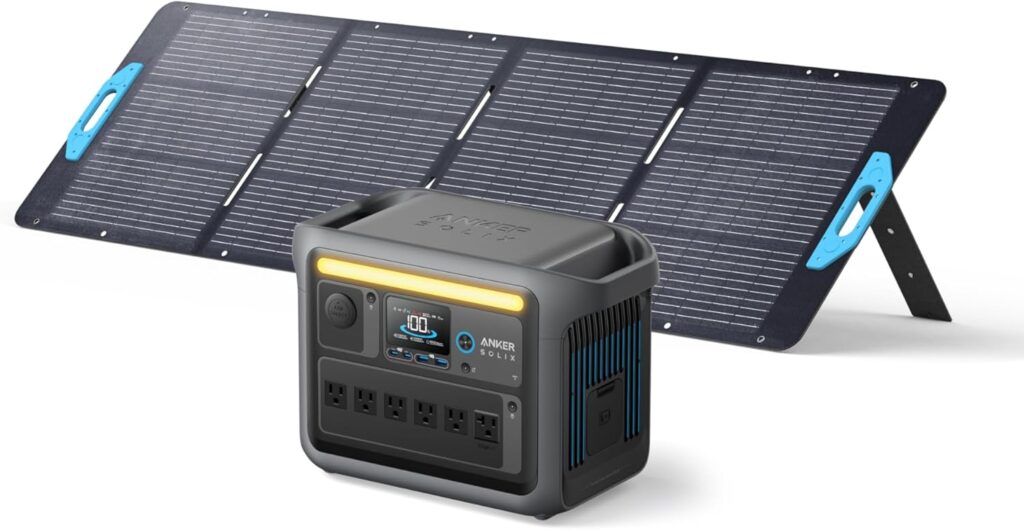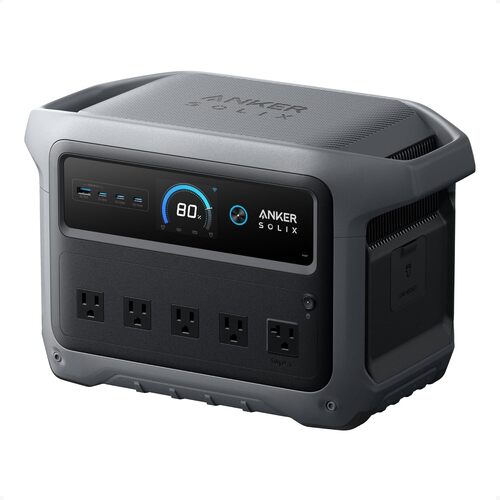
Anker SOLIX C1000 Gen 1 vs Gen 2 is not a simple old-versus-new contest. The original has 1,056Wh, six AC outlets, an emergency light, and an expansion path to 2,112Wh. Gen 2 trims base capacity to 1,024Wh and removes expansion, but raises continuous output to 2,000W, increases peak output to 3,000W, cuts fast AC recharge to 49 minutes, reduces transfer time to under 10ms, and lowers carry weight to 24.9 pounds.
The capacity difference is only 32Wh. Expansion, charging time and carry weight are more useful tie-breakers than that small base-capacity gap. If you already own Gen 1, identify the limitation you need to solve before replacing it.
Neither model should be chosen from a “surge” headline alone. Startup behavior depends on the exact appliance, simultaneous background loads, voltage quality, and the manufacturer’s definition of peak operation. Test the intended refrigerator, pump, microwave, CPAP, network gear, or workstation during the return window. A successful owner scenario is useful evidence for a plausible use, not a promise for different equipment.
C1000 Upgrade Ledger: Five Changes That Affect the Decision
| Change | Gen 1 | Gen 2 | Who notices |
|---|---|---|---|
| Continuous output | 1,800W | 2,000W | Mixed appliance loads and startup-sensitive equipment |
| Fast AC input | 1,300W | 1,600W | Short grid or generator recharge windows |
| Expansion | Up to 2,112Wh | None | Buyers expecting longer outages later |
| Transfer | 20ms | Under 10ms | Network and desk equipment after exact-device testing |
| Carry weight | 28.44 lb | 24.9 lb | Anyone moving the station every trip or outage |
Quick rule: if prices are close, buy the Anker SOLIX C1000 Gen 2. If the original C1000 is heavily discounted or you specifically need expansion support, the Gen 1 still deserves a look.
What Gen 2 Improves—and What It Removes
The Gen 2 upgrade is not mainly about capacity. In fact, the original C1000 has a slightly larger listed battery: 1,056Wh vs 1,024Wh. That looks odd at first, but the difference is tiny in real use.
The bigger changes are about performance and handling. Gen 2 increases AC output from 1,800W to 2,000W, raises surge from 2,400W to 3,000W, cuts fast AC recharge from about 58 minutes to 49 minutes, while both generations retain a 600W maximum solar input. Read our Anker SOLIX C1000 Gen 2 performance review for documented charging modes and owner-reported trade-offs.
That gives Gen 2 a cleaner role: it’s the better grab-and-use power station for most buyers. Gen 1 is more of a value-and-expandability play.
Keep Gen 1 or Move to Gen 2?
Keep or buy Gen 1 when
- An expansion battery is part of the plan.
- Six AC receptacles prevent a separate power strip.
- The sale price leaves budget for panels or a measured load meter.
Move to Gen 2 when
- The station moves frequently.
- Loads need more continuous or startup headroom.
- Fast restoration and sub-10ms transfer are real requirements.
An existing Gen 1 owner should not upgrade merely for 32Wh less nominal capacity in a newer shell. Replace it only when one or more Gen 2 improvements resolves a documented limitation. A first-time buyer should reverse the logic: select Gen 1 only when expansion or the discount has measurable value.
For broader use-case picks, compare these with our best portable power stations for camping and best power stations for home backup guides.
Energy Is Nearly a Draw
The original C1000 technically has more listed capacity. However, the difference is only 32Wh, which is not enough to change the buying decision for most people.
In real use, both models land in the same runtime class. They’re good for small electronics, routers, CPAP machines, lights, laptops, and short fridge backup. They are not built for long heater use, long induction cooking, or running a whole house overnight.
For an energy estimate, enter the same devices, hours, efficiency, and reserve in the power-station size calculator. Compare that requirement with each base capacity, then add an expansion battery only to the Gen 1 plan. Refrigerator duty cycles can change the result substantially.
The Appliance-Startup Gate
Output is the main performance reason to choose Gen 2. The original C1000 already has enough power for plenty of real-world loads, but the newer model gives you more room before you hit the ceiling.
The C1000 Gen 1 has 1,800W continuous output and 2,400W surge. That’s plenty for routers, laptops, CPAP machines, Starlink, lights, fans, small tools, many fridges, and short appliance bursts.
The C1000 Gen 2 raises that to 2,000W continuous output and 3,000W surge. That extra surge headroom is helpful for fridge compressors, small power tools, coffee makers, and appliances that briefly pull more power when starting.
Still, don’t overread the output number. A 1,500W heater may run, but it won’t run long. The battery size remains the limiting factor.
Output takeaway: Gen 2 is the better pick if you want the most appliance headroom in this size class.
The 49-Minute Recovery Advantage
Both models accept up to 600W of solar according to the retained records, so panel matching—not total watts—becomes the solar discriminator. Verify cold-corrected open-circuit voltage, current, connector, polarity, and daily harvest against the exact manual.
Fast charging changes how you use a power station. During a storm, road trip, or generator-assisted outage, a 10-minute difference can matter more than it sounds.
The original C1000 Gen 1 supports up to 1,300W AC input and can recharge in about 58 minutes in fast mode. That’s already quick for a 1kWh-class unit.
The C1000 Gen 2 improves wall charging to 1,600W AC input and about 49 minutes in fast mode. That makes it the better option if you often top off quickly before leaving, between outages, or while running a generator briefly.
Anker lists 600W maximum solar input for both generations, including the C1000 Gen 2, so headline solar wattage is not an upgrade advantage. The older model’s supplied data is clearer about XT60 and 11–60V MPPT support. For Gen 2, confirm connector details before pairing third-party panels.
Car charging is useful on both, but it’s a top-off method. It’s not the main way to refill a 1kWh battery from empty.
Charging takeaway: Gen 2 wins for AC charging. Solar is close enough that connector compatibility matters more than the headline wattage.
Three Reasons the Original C1000 Still Wins
The original C1000 is not just “the old one.” It has three practical advantages that can still matter.
First, it supports expansion. With the compatible expansion battery, the system can reach 2,112Wh total. That makes Gen 1 better if you want to start with a 1kWh station and add runtime later.
Second, the port layout is clearer from the supplied specs. You get six AC outlets, 2 USB-C ports, 2 USB-A ports, and a 12V car socket. If you want to plug in several AC devices during an outage, that known six-outlet setup is useful.
Third, the built-in light is small but handy. During a blackout, campsite setup, or late-night garage power check, you may appreciate it more than expected.
Gen 1 still makes sense if:
- You find it at a strong discount.
- You want expansion battery support.
- You prefer six known AC outlets.
- You want a built-in emergency light.
- You don’t need the highest output in the C1000 lineup.
Who Benefits From the New Platform
Gen 2 is the cleaner choice if you’re buying at today’s prices and the gap is not huge. It takes the same basic 1kWh idea and makes it easier to live with.
The unit is lighter. It recharges faster. It has more output. It has a higher surge rating. It lists a stronger cycle-life claim. It also improves backup switching from 20ms on Gen 1 to under 10ms on Gen 2.
That combination matters if the power station will move between your house, vehicle, campsite, RV, garage, and office. A few pounds less and a little more output can make the unit feel more useful day to day.
Gen 2 is the better fit if:
- You want the strongest C1000 version.
- You care about appliance startup headroom.
- You’ll move the unit often.
- You want faster AC charging.
- You plan to cycle the battery frequently.
- You don’t care about expansion batteries.
A 3.5-Pound Difference With Daily Consequences
Neither power station is ultralight. However, both are still in the practical car-camping and room-to-room range.
The Gen 1 weighs 28.44 lb, which is still manageable but close to the upper edge of the comfortable carry category. You can move it, but you’ll notice the weight.
The Gen 2 weighs 24.9 lb, and that matters if you carry it often. It’s easier to move from the garage to the kitchen, from the RV to the picnic table, or from the car to a campsite.
Portability takeaway: Gen 2 wins. Not because Gen 1 is hard to move, but because Gen 2 makes the same job easier.
Cycle Ratings Are Not the Only Ownership Variable
Both models use LiFePO4, which is exactly what you want in a power station that may be used often. Compared with older NMC lithium-ion packs, LFP usually gives you longer cycle life and better long-term durability.
The original C1000 Gen 1 lists 3,000 cycles to 80% capacity. The C1000 Gen 2 lists 4,000 cycles to at least 80% capacity.
That gives Gen 2 the better long-term spec. For occasional camping, both are strong. For frequent outage prep, RV use, desk backup, or regular cycling, Gen 2’s higher cycle claim is more attractive.
Planning unattended backup? A faster generation-specific switchover does not settle bypass capacity or recovery. Before relying on either model, check transfer time, power-path limits, and commissioning steps for the exact load.
The C1000 Price-Gap Rule
Include required panels, expansion battery, cables, and any protected power distribution in the comparison. A cheaper base unit can become the more expensive system, while a newer unit can be poor value if its improvements never affect the intended loads.
Price should probably decide this comparison if the gap is large. Specs should decide it if the gap is small.
A simple $/Wh calculation can help, but don’t rely on it alone. Divide current price by battery capacity, then compare the result against output, charging speed, weight, cycle life, and expansion support.
The original is the more useful platform when expansion is essential. Gen 2 is the stronger self-contained option when its charging and handling advantages matter to your use.
For more brand-level alternatives, see our Anker vs EcoFlow and Anker vs Jackery comparisons.
Return-window drill: run the priority appliance from startup through a representative duty cycle, time a full recharge at the chosen setting, confirm both local and app controls, and interrupt then restore utility power. For Gen 1, connect the intended expansion battery before the return window if that feature drives the purchase. For Gen 2, verify that the non-expandable 1,024Wh energy budget covers the longest required duty cycle.
Record firmware, charge limit, discharge reserve, temperature, and load watts with each result. That record separates a product limitation from a setup problem and makes any support request more actionable. It also gives the next outage a repeatable operating procedure rather than an improvised guess.